The Very Big Spreadsheet
My risk register case study, told as a picture book. My job was to write the blueprint for a very full spreadsheet’s new home. ECS built it.
Meet everyone in this book
I didn’t do this alone. The sticker on every picture matches one of these names.
- I made this
Me, Stephen
- Wrote the rule book, all 18 versions.
- Wrote the design document: six goals and four groups of people.
- Built the Figma prototypes and the mock-data spreadsheets.
- Put together the reference pack.
- Traced the 5 changes and wrote the testing recap.
- Checked the app against the rule book and wrote the testing rules.
- Made the plain-language deck.
- Business owner’s note
The business owner
- Owned the register and said what went in.
- Mapped 17 kinds of users across three markets.
- Held the red pen on the wireframes.
- Found the problems in testing.
- Spotted that “late” was the wrong word.
- Made by ECS
ECS, the build team
- Drew the first wireframes.
- Built the app in Power Apps and launched it.
- Fixed what testing found.
- Planned the order to build Phase 2.
- Made by the team
The project team
- Compliance made the first spreadsheets.
- The team made the Power BI demo, the release plan and the support map.
- Team idea, my designs
All of us together
- The AI assistant was a team idea. I added designs. It never shipped.
Also starring: seven made-up charactersPoke one
They’re made up. But only a little. Poke one and see what they say.
Big Sheet The very big spreadsheet. Grumpy, full, secretly kind.
Scoot A runaway envelope. Hides in every drawing.
Chatty A shiny chatbot. Very patient. Not really.
Red Pen Draws circles. Means business.
Detective Proof A magnifying glass. Guards every proof flap.
Scope Creep A sneaky vine. Always has one more thing.
Makey An AI design helper. Grades itself very kindly.
Plan of the house
Eight chapters, from a crowded old house to moving day and a brand-new wing. Each chapter has a short story, the real things we made, and a flap with the proof.
A runaway envelope hides in every chapter’s drawing, and one more is hiding on the cover. Tap each one to send it home. The sign at the top keeps count.
Dashed rooms were still pencil plans. Solid rooms were built.
- 1A crowded old houseBefore I cameEveryone needs it. Nobody can find anything.
- 2Meeting the familyAug to Sep 2025Learn first, draw later
- 3Dream housesSep to Oct 2025Data entry first, chatbot later
- 4The building codeOct to Nov 2025Three partners, one house
- 5The blueprintNov 2025 to Jan 2026Models everyone could see
- 6Inspection dayJan to Feb 2026“Just one more thing”
- 7Moving dayMar 2026Built and launched by ECS
- 8A new wingApr to May 2026“Late” became “missing”
The drawings are new. Every screenshot, slide, diagram and video is from the real project, with sample data.
Once upon a time, Big Sheet lived in a very crowded house.
In a busy town, everybody needed the same list. It showed the business risks and what people were doing about each one.
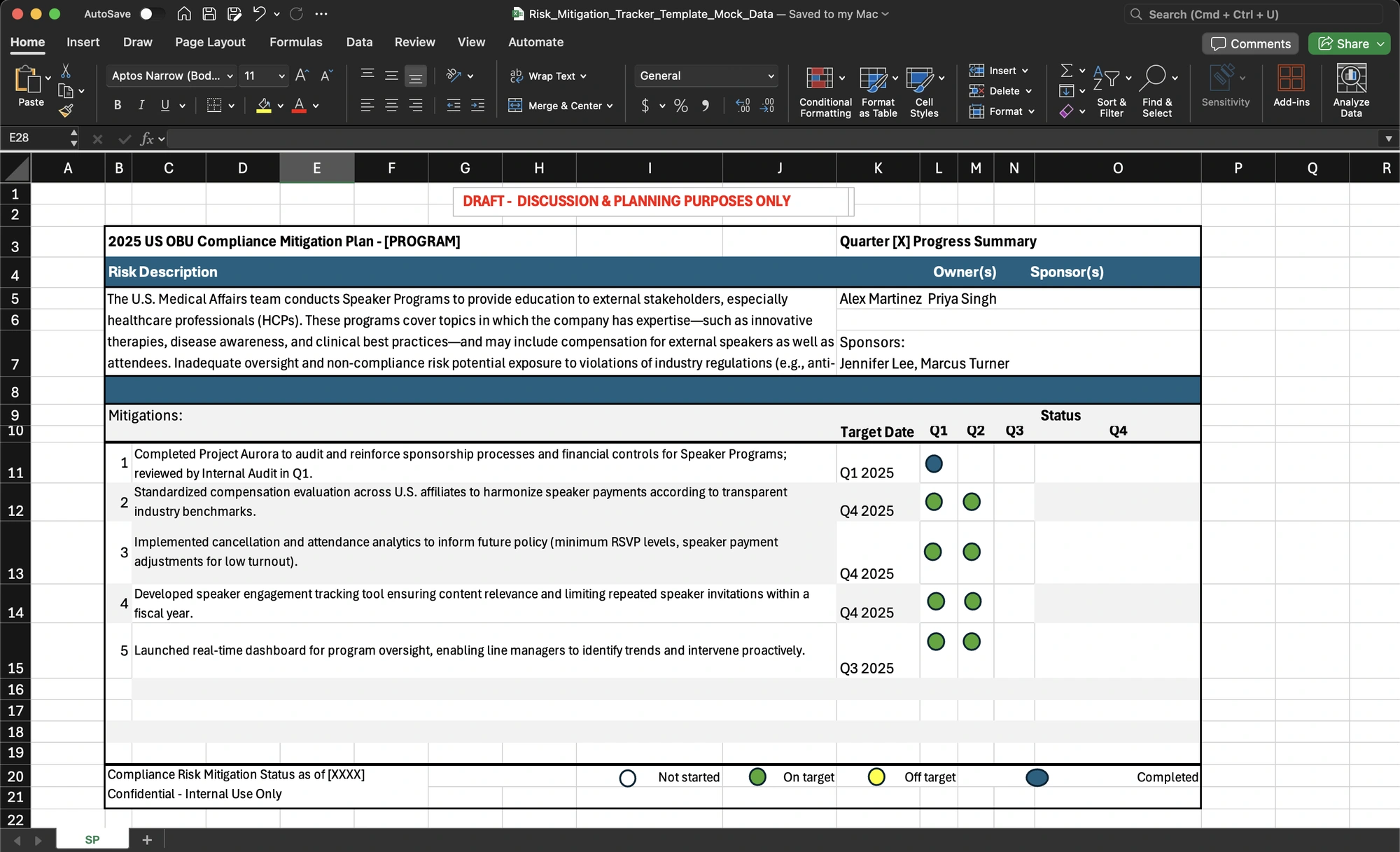
The list lived with Big Sheet, a spreadsheet whose house was so crowded that finding anything took a flashlight.
Big Sheet: I’m not messy. I’m just… full.
Updates came by email and flew around like runaway envelopes. Some never came home. Leaders waited for slides made by hand. And whenever the auditors asked for proof, everyone went digging.
Scoot: Wheee! Bye! I’m off to somebody’s inbox. Probably.
Detective Proof: Who changed this? When? Where’s the proof?
Everyone agreed that Big Sheet needed a new home. The team even wrote it on the first slide of their proposal: “From spreadsheets to an automated, auditable, role-based workflow.”
But a new home needs a blueprint first. Writing it would be my job.
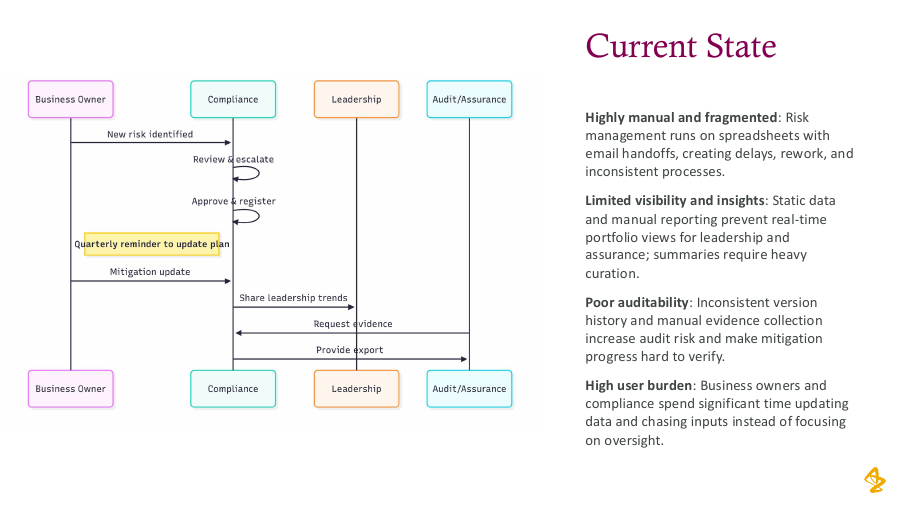
The old way to add a risk
- A team spots a risk
- A Compliance partner checks it
- A committee approves it
- Someone types it into Big Sheet by hand
Grown-up skillSeeing the whole mess first
More from this chapter1 more thing
Detective Proof says: lift the flapdates, counts and sources
- The team named four problems: the work was manual and scattered, it was hard to see, it was hard to audit, and it was a lot of work for the people filling it in. Source: the team’s project overview deck, page 3.
- Compliance made the spreadsheet templates in May 2024 and June 2025, before I joined.
- September 2025: the team’s proposal slides, from Compliance and Commercial IT, carry the line quoted above and show the old path for adding a risk: the team raises it, a Compliance partner checks it, a committee approves it, and someone adds it by hand.
Built so far. Just added: A reason to move
A new helper came to learn how the family lived.
I joined the team in late summer 2025 as the new helper. Before drawing a single wall, I wanted to learn how the family lived day to day.
The business owner looked after the list, and she showed me around. She knew exactly what the family needed, and she became my partner for the whole build.
Then I went to the library. I watched how the work happened, and I took a lot of pictures. My very first sketch still counted calories.
Big Sheet: All those pictures? Did you at least get my good side?
Me: You don’t have a good side. You have columns.
I made pretend copies of Big Sheet, full of made-up data, so the whole team could practice without touching real records.
Together we kept four groups of neighbors in mind, each with a need and a hurt.
Needs: An easy way to update their risks.
What hurts: Too many spreadsheets. Unclear who owns what.
Business owners
Needs: To see every risk and its history.
What hurts: Chasing people by email. No record of edits.
Compliance
Needs: Trends at a glance, and detail when they want it.
What hurts: Waiting for slides made by hand.
Leaders
Needs: Proof they can export and trust.
What hurts: Slow exports and a fuzzy history.
Auditors
Grown-up skillLearning before building
More from this chapter1 more thing
Detective Proof says: lift the flapdates, counts and sources
- 58 screenshots and 3 screen recordings, dated 27 August to 29 September 2025. 17 Mermaid diagram exports, dated 16 to 25 September 2025. Counted from file names in the project archive.
- Mock-data copies of both Compliance spreadsheets, last saved by me on 17 September 2025.
- My design document: 20 slides, created 22 September 2025. The success measures in it were goals. Nobody measured them.
Built so far. Just added: Knowing who lives here
Everyone had a dream house in mind.
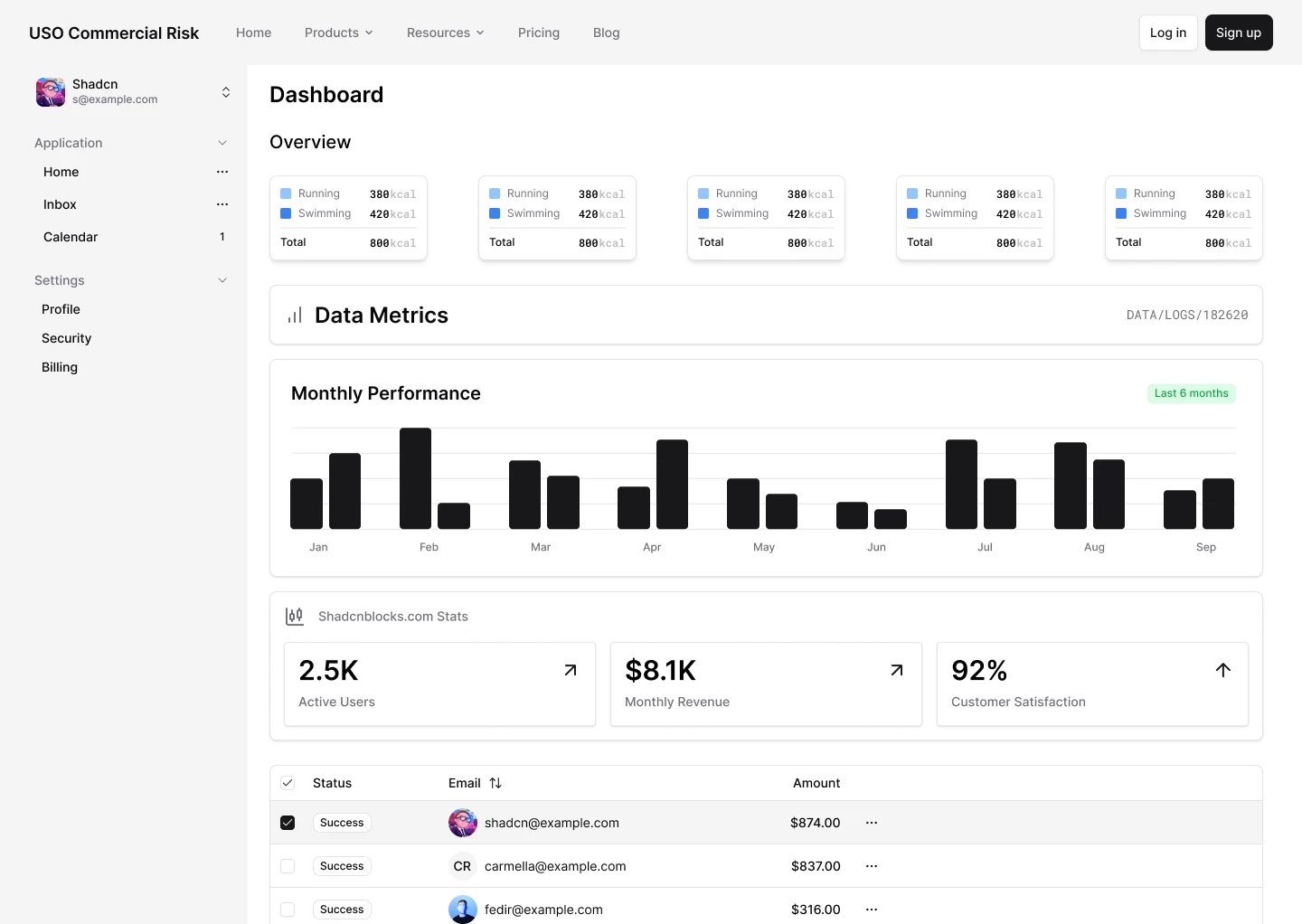
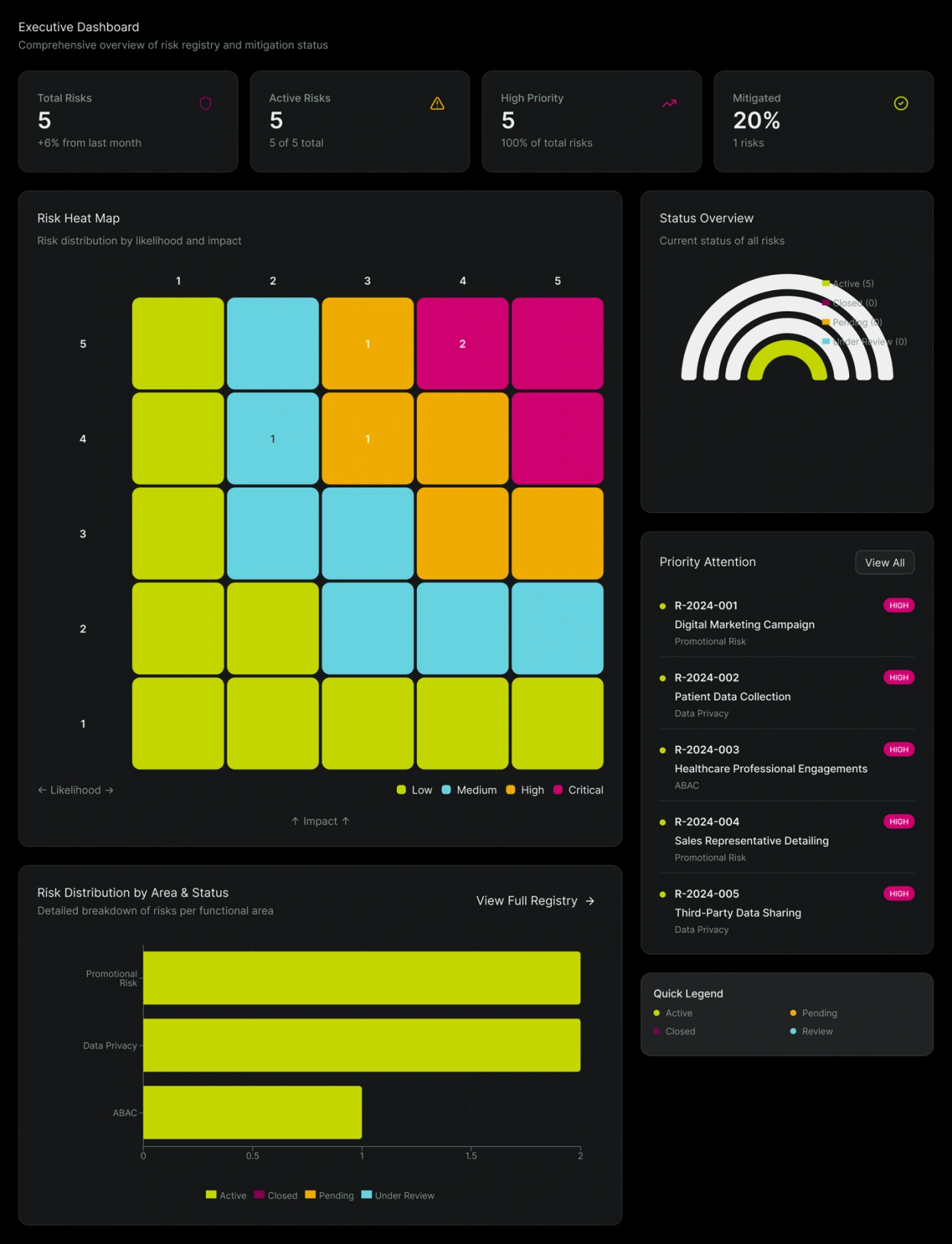
Before ECS built the new house, we needed to agree what went inside. The team made a dashboard demo. I used Makey, an AI design helper, to build clickable prototypes: models we could review, not working apps. The business owner could try a screen, explain what was missing, and make a decision I could put into the requirements.
Makey: Done! I graded my own work. It’s excellent.
Me: Let’s make it even better, buddy.
And then the shiniest idea of all rolled up.
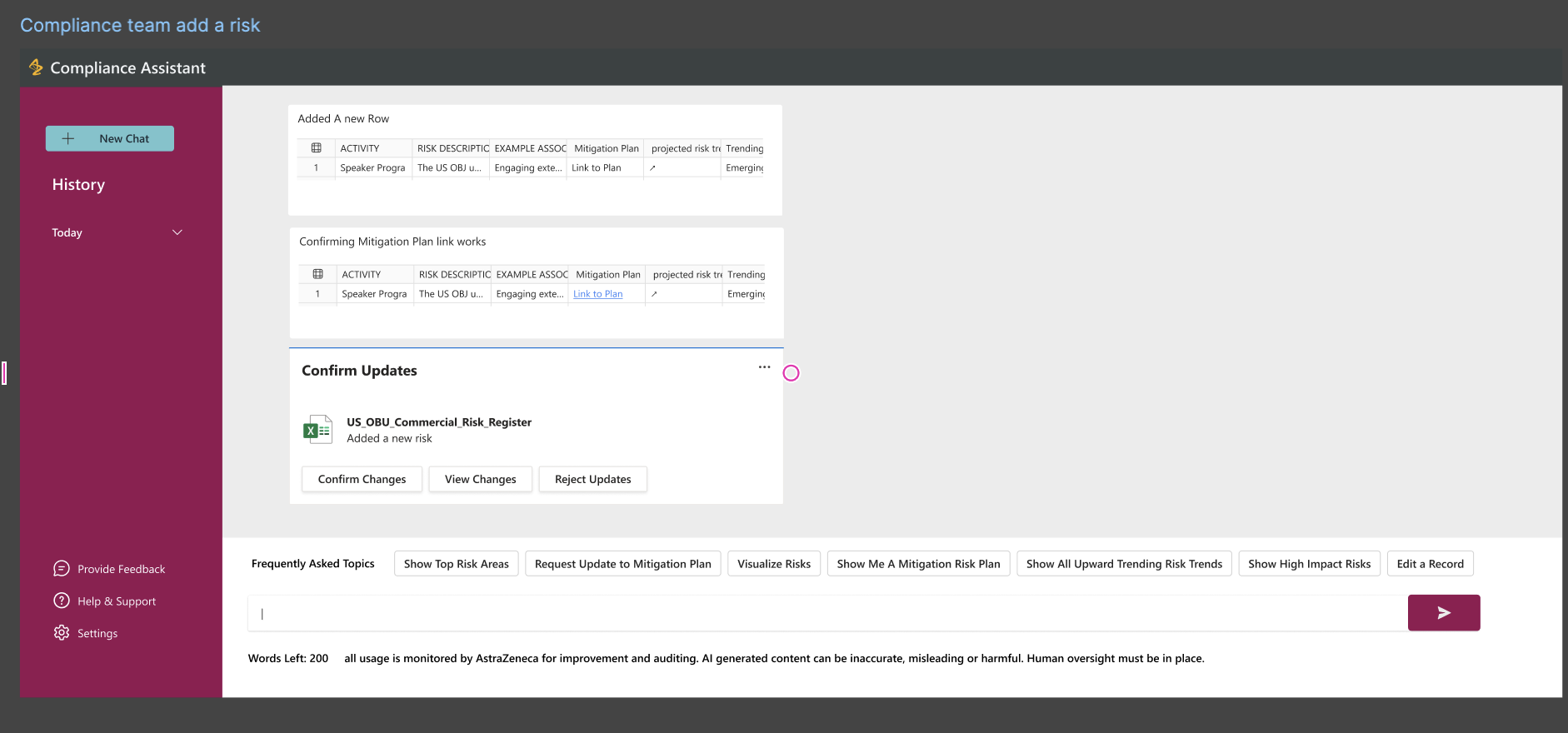
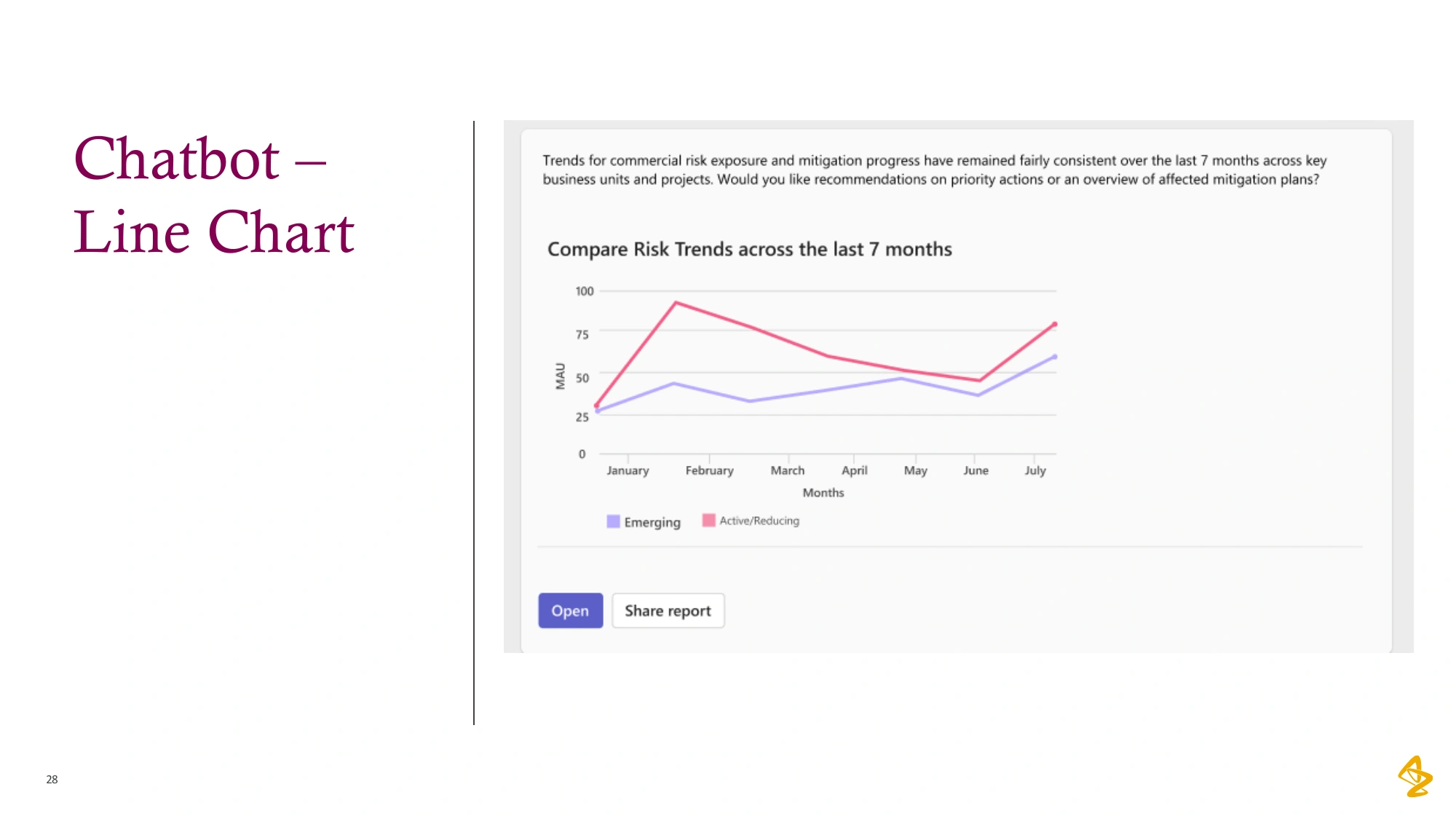
Chatty: Hi! I’m Chatty! Ask me ANYTHING about risks!
Me: Love it! Can you help people fill in the list?
Chatty: …Next question!
That was the catch. Before an assistant could help with this register, people needed a reliable way to record the risks and updates. Our assistant screens showed ideas using sample data. They did not prove a connected service or reliable AI answers.
So we asked what the family needed on the first day. A front door comes before a chandelier. The team prioritized entering and updating the risk records. ECS would build that in Power Apps. The assistant stayed a proposal; it never shipped.
Chatty: Is it my turn yet?
Me: Not yet, buddy. But we saved you a spot on the list.
We choseA front door: a way to put the list in
We gave upThe chatbot, for now
Try my risk register prototype(opens Figma in a new tab)
Grown-up skillSaying “not yet” to a good idea
More from this chapter6 more things
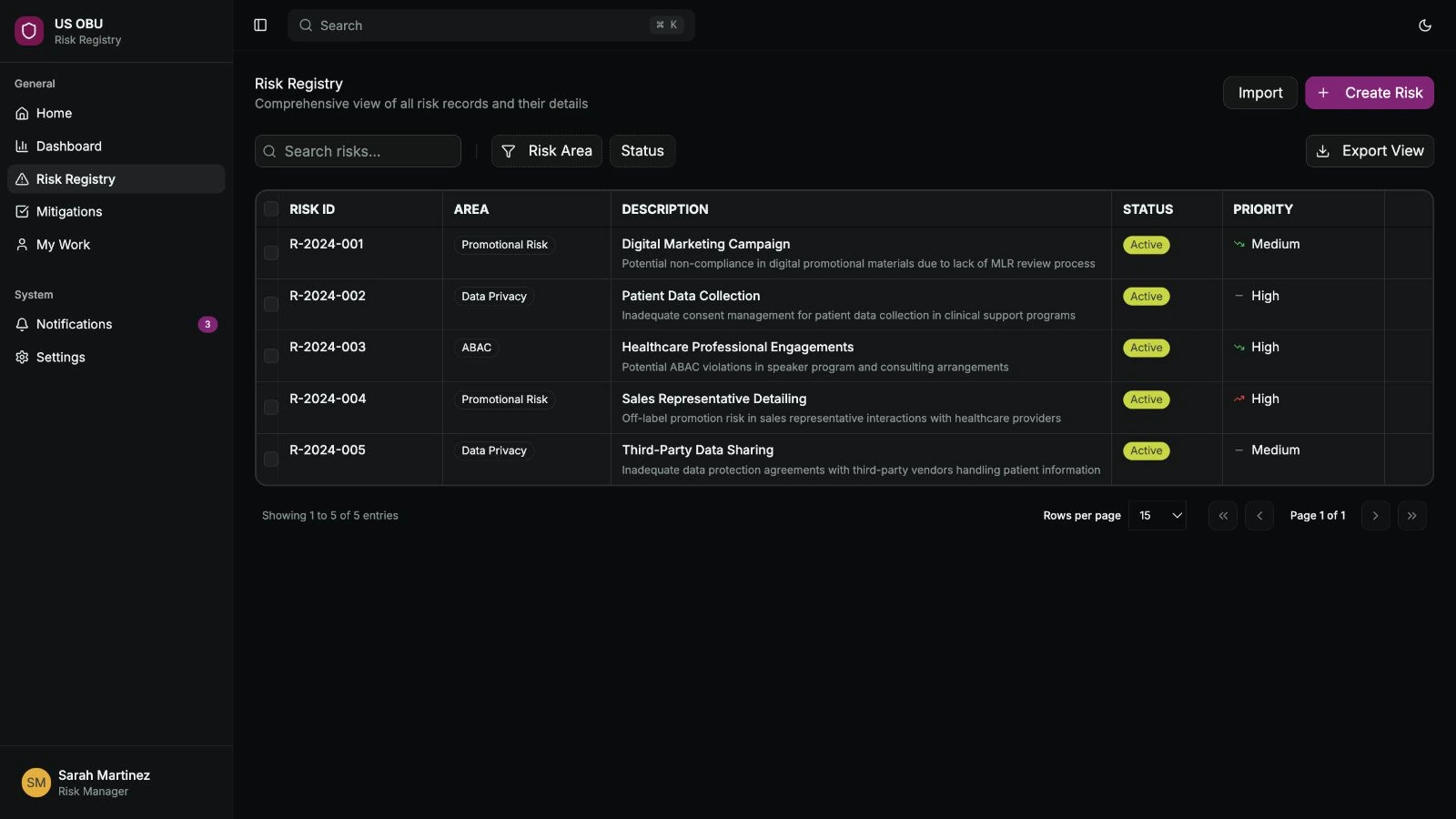
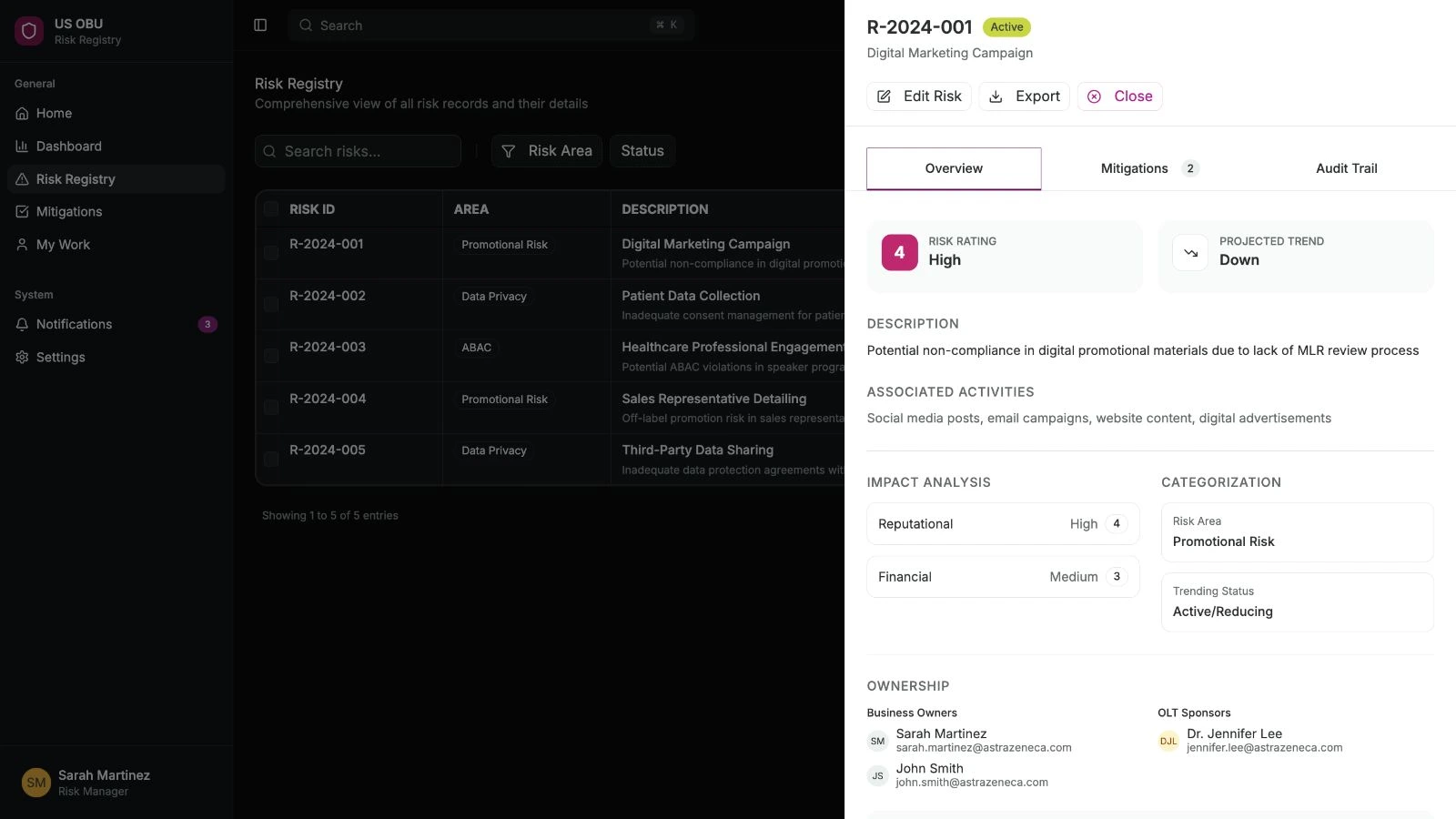
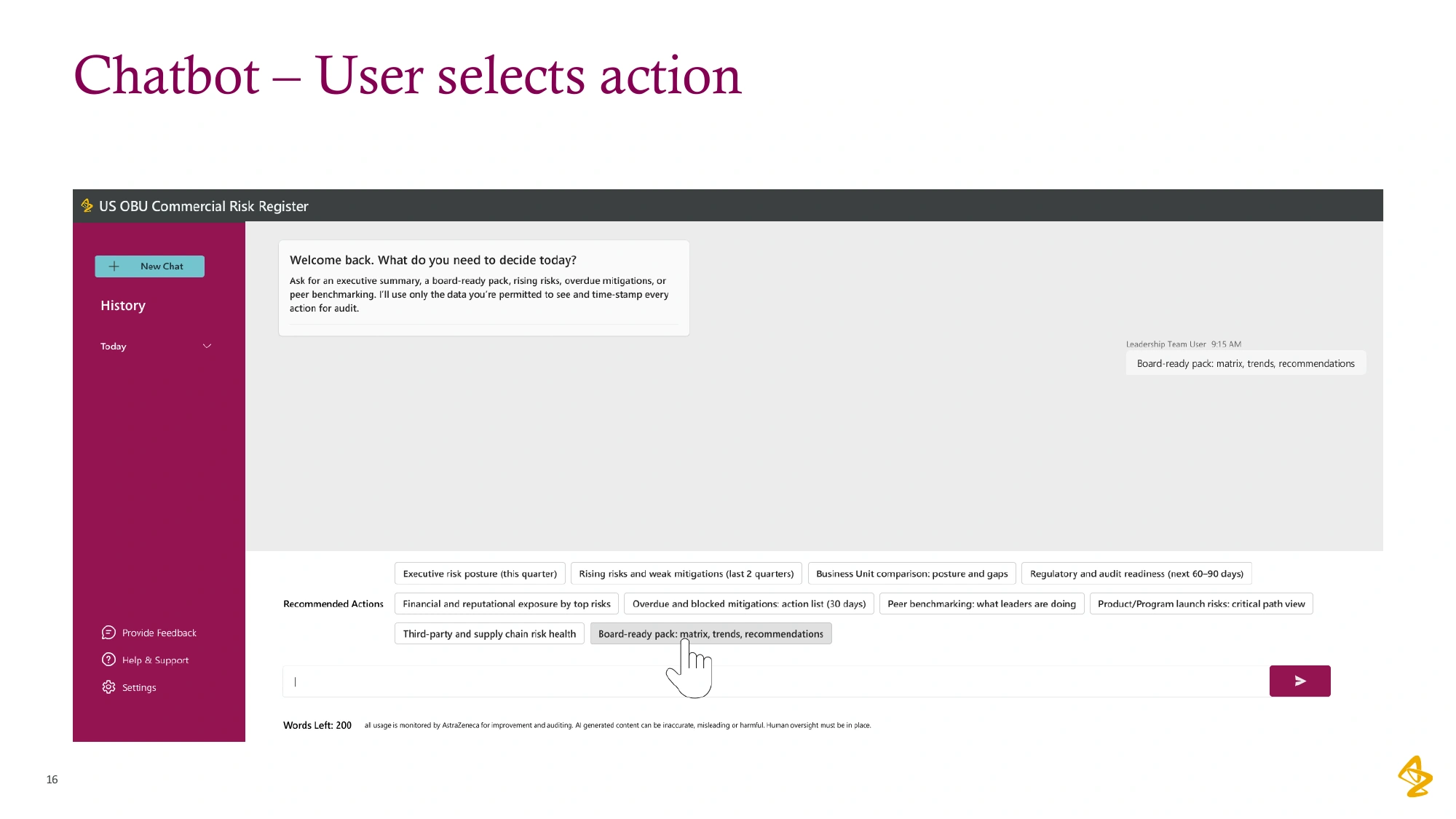
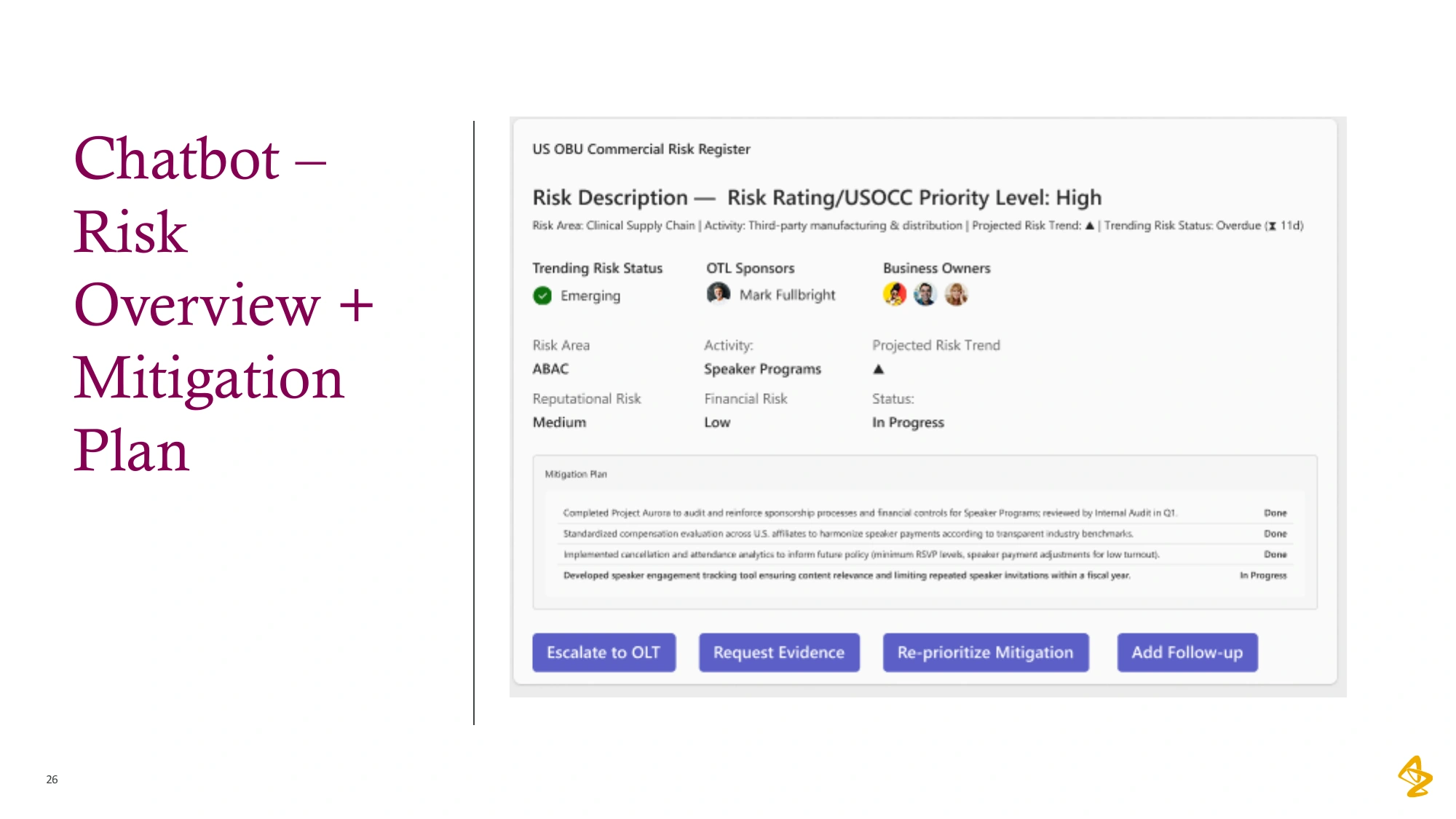
Detective Proof says: lift the flapdates, counts and sources
- My Figma Make files for the assistant were created on 1 and 2 October 2025. The register prototype reached version 33.
- Meeting minutes, 16 October 2025: “Priority is given to the data entry phase.” The team put the chatbot off, and ECS would run support.
- The same day, the business owner made a sheet of 17 kinds of users across the US, EUCAN and Global teams. 8 of them could look but not edit. The first release only served the US.
- The assistant work was a team proposal. I added design ideas to it. It was never released.
- 8 September 2025: my screenshot of the company’s existing Compliance Assistant, a separate internal tool, answering “I’m sorry, but I don’t have the information you’re looking for.” It isn’t shown here because it isn’t this project’s work.
Built so far. Just added: A front door first
Every good house follows the building code.
Ours had one big rule. The new home had to use the company’s Microsoft tools. SharePoint kept things, Teams was for talking, and Power Apps ran the app itself.
The builders were ECS, a skilled team working from another time zone. That meant the work kept moving even while our side of the world was asleep. Handy!
So the house had three partners. The business owner knew what the family needed. ECS knew how to build it. And I drew the plans and kept everyone on the same page. Before anyone broke ground, we also lined up the safety checks, like privacy reviews.
Big Sheet: Wait. I’m moving INTO an app?
Me: You’re getting a much nicer house.
Grown-up skillWorking inside the rules

Detective Proof says: lift the flapdates, counts and sources
- ECS built the app in Power Apps. The 16 October 2025 minutes say ECS would also run support.
- 5 November 2025: I made a page of links for the privacy reviews. A colleague started the privacy questionnaire.
- ECS was the offshore delivery team. My plain-language deck says the team spanned time zones.
Built so far. Just added: The building code
The blueprint was long, so I built little models.
I started with the business owner’s spreadsheets and mapped how the work moved between people. Then I wrote the blueprint: who could do what, which fields each form needed, and what belonged in the release. ECS needed requirements it could build. The business owner needed a way to check that they matched her process.
A long blueprint was hard to discuss across time zones and different tools. I made new sample spreadsheets, flow diagrams and clickable Figma prototypes. We used them in calls and reviews, then I traced the feedback back into the spec. Its history records 18 versions; those are requirements revisions, not 18 releases.
Scoot: Wait. There are RULES now?
Me: Mostly about where you should go.
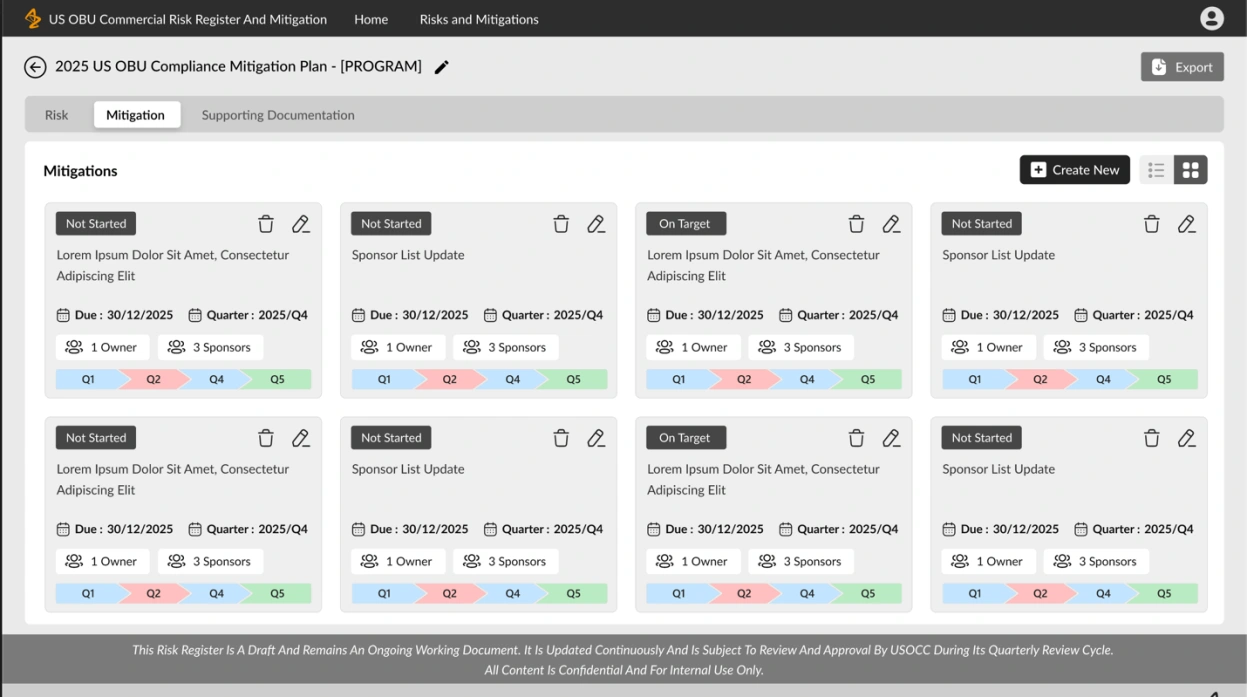
I built little models: clickable prototypes and flow diagrams. I also made one reference pack. It put the old spreadsheets, the team’s dashboard, my screens and ECS’s first wireframes side by side. The business owner reviewed the behavior, ECS checked what it could build, and I updated the requirements. The models gave all three of us something concrete to point at.
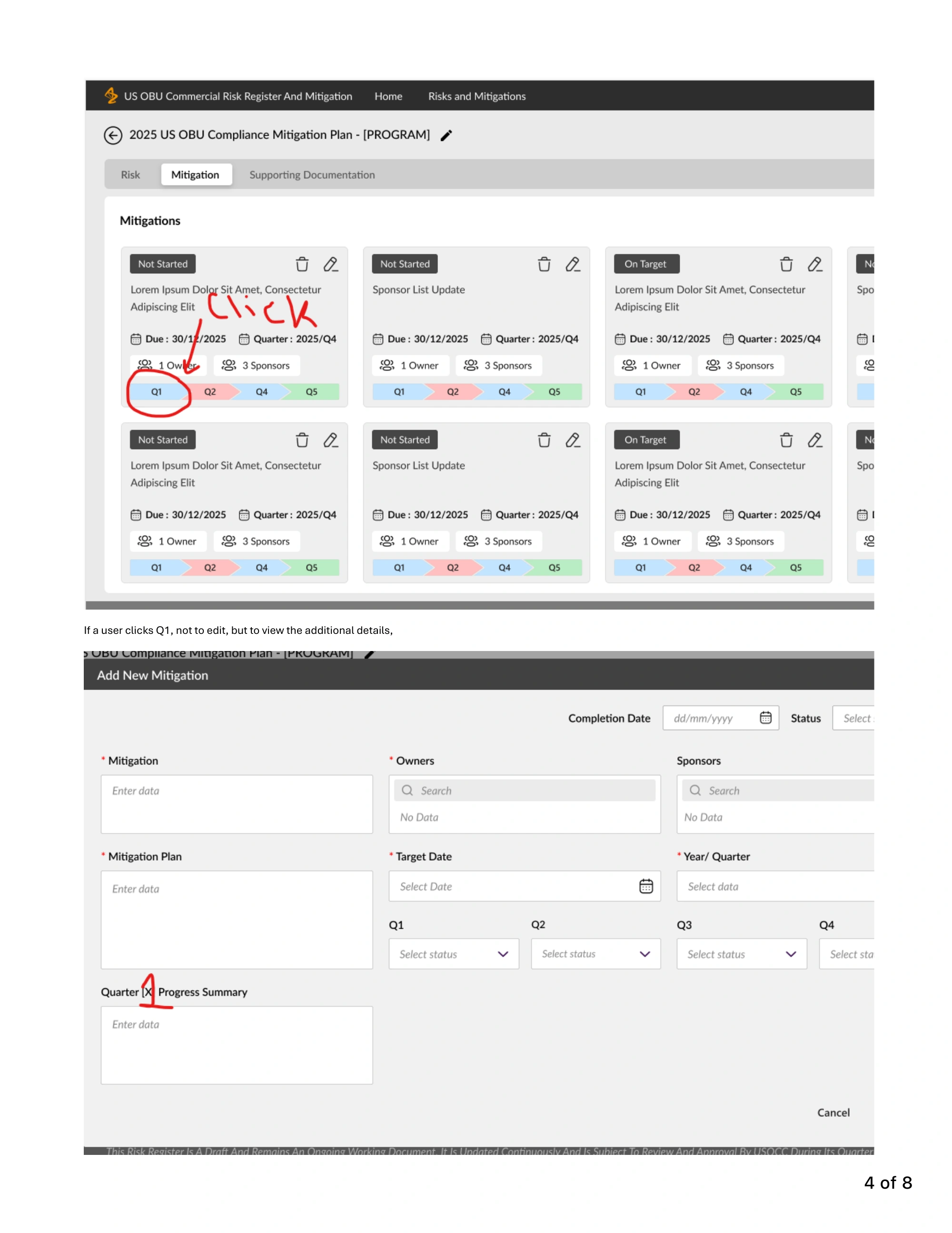
Now we could point at real buttons instead of guessing. The business owner picked up her red pen.
Red Pen: Just one tiny circle.
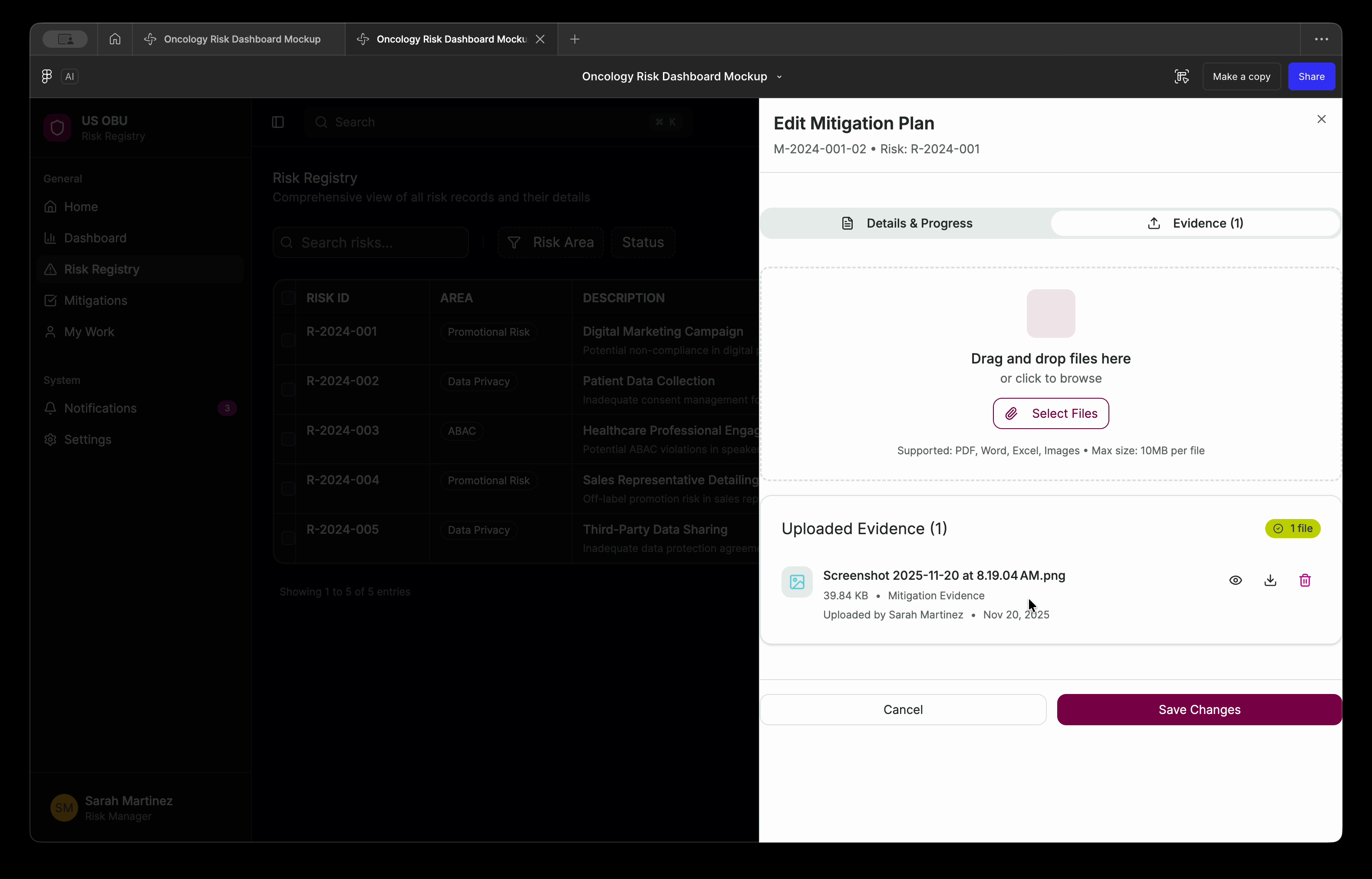
Click a quarter, she wrote, and show its progress without making me edit. ECS said yes, and she approved the sketches with one fix.
Red Pen: I’ll be back.
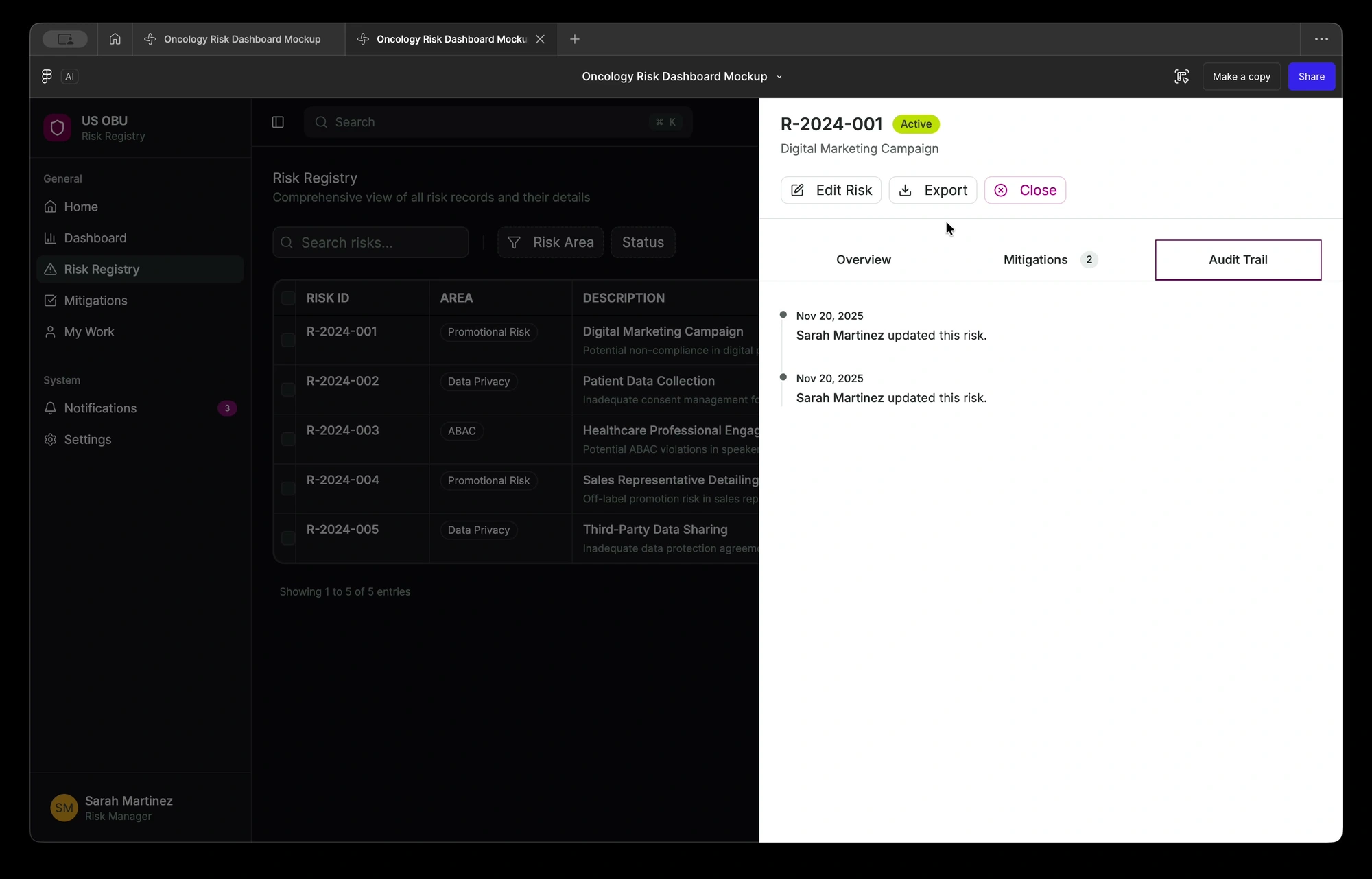
Small words mattered too. Before one big review in January, my notes started with a thank-you to ECS for their progress on the wireframes. Then I suggested clearer names: “Audit Trail” became “Version History”, and the delete button got a trash can instead of a green check mark. Nobody should have to guess what a button does.
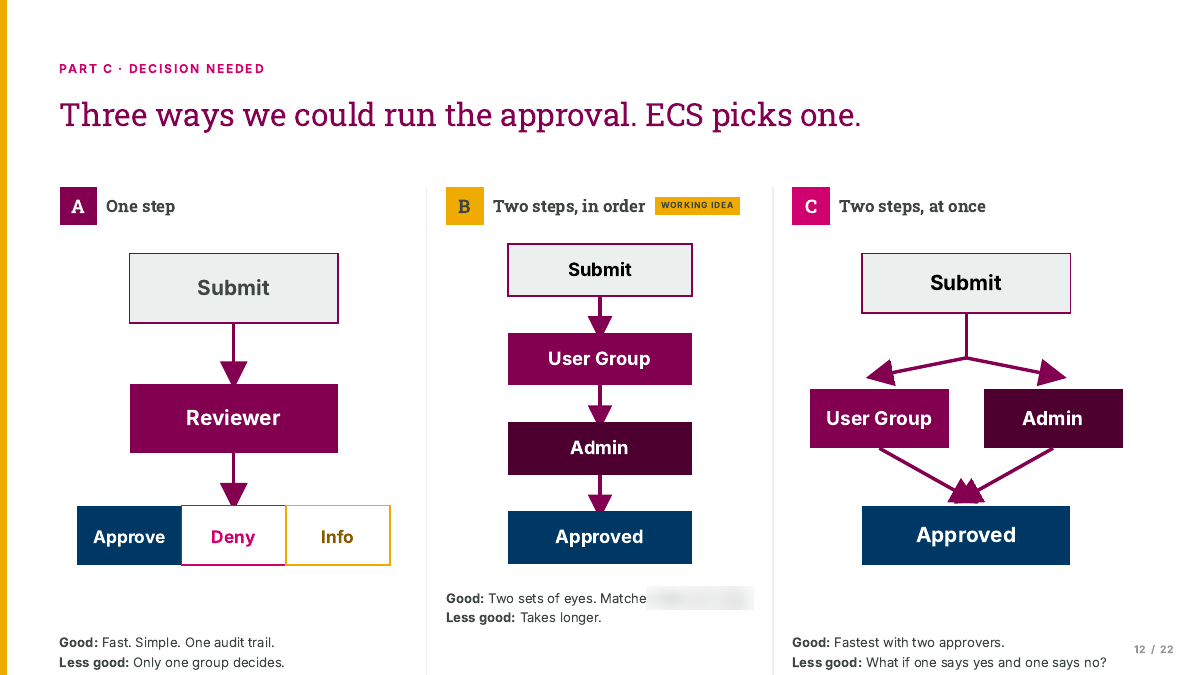
In one January session, we even agreed a new way to handle approvals, right there in the room. Compliance would approve, and the leadership team would watch. Reports would also export as PDFs, so nobody could change them after they left the app.
The models helped us agree what to build. They did not settle what would fit in the release. That needed traceable requests, effort estimates and the business owner’s decisions. Inspection day put that agreement to the test.
Cancel a risk, keep the finished work.
Unfinished plans get canceled too. Work that is done stays in the record.
Sent for review? Hands off.
Sending a plan for review locks it. Nobody can review their own work.
Earlier draft rule: only the Admin deletes a risk.
That was the December working-session rule. The later Compliance decision replaced deletion with cancellation and a reason. The record stays whole.
Grown-up skillHelping everyone picture the same thing
More from this chapter5 more things
Detective Proof says: lift the flapdates, counts and sources
- Version 1.0: 14 November 2025, author “SB”. Last version: 1.17 on 29 April 2026. That is 18 versions, and 5 of them came out on 28 April.
- By version 1.17 it had 30 features: 18 for the first release, 11 for Phase 2, and one policy-exception workflow in its own section, waiting for approval.
- It had 11 security, 7 data-integrity and 5 privacy requirements. I filled those in from AstraZeneca’s template and from reviews other teams ran.
- 10 user roles, 7 use cases, and a chart that gives each of 12 actions a clear owner.
- The approval signature boxes are blank in every copy I have, so I don’t claim a formal sign-off.
- The reference pack and ECS’s wireframe are both PDFs from December 2025.
- 18 December 2025 working session: the Admin is the only one who can delete a risk. Deleting a plan needs a written reason for the record.
- January 2026 sessions: the team merged two owner roles into one, and exports became PDFs with their history.
- 29 January 2026: my pre-meeting notes for the wireframe review. Step one: acknowledge ECS’s progress. They list the renames above and say the fixes were labels only, with no data changes.
- 8 January 2026 session transcript: approvals moved from the leadership team to Compliance, and the business owner asked for PDF exports so reports can’t be edited.
Built so far. Just added: Little models
Scope Creep sneaked in, and then came inspection day.
Just when the walls were going up, a sneaky little vine crept onto the building site.
Scope Creep: Psst. Just one more thing.
Scope Creep: Okay. Five more things.
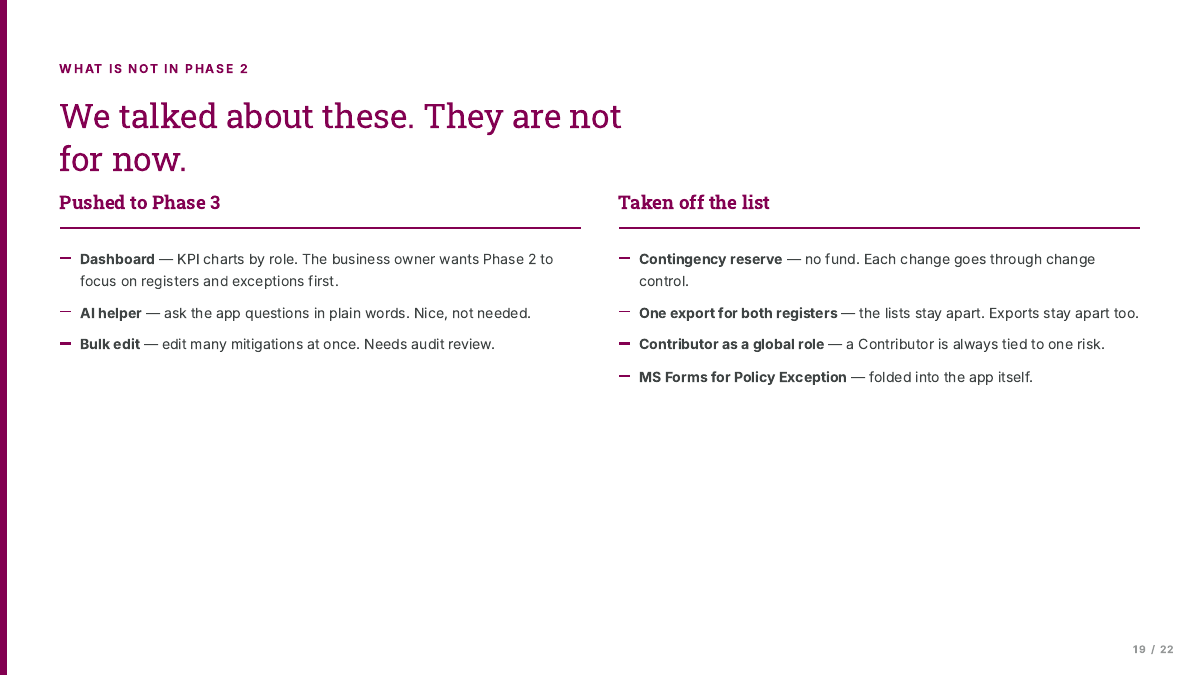
The business asked for changes. I traced every one back to the blueprint or to the person who asked, so none of them shook the foundation. We agreed to save a few bigger things for the next phase, like the dashboard and a rule for flagging late work. That kept the first house solid. (Keep an eye on that late-work rule. It comes back.)
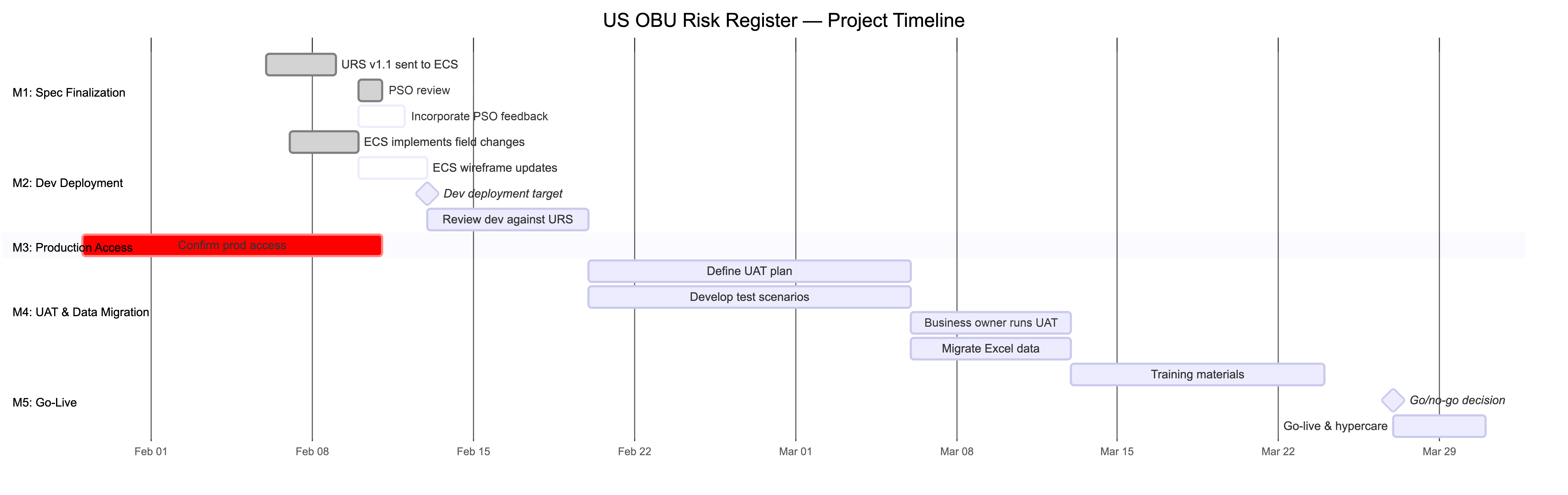
Then came inspection day. The business owner logged 43 observations in four days. ECS fixed 32 inside the window, but marked all four major items for Phase 2 without her agreement. A prototype could show the problem; it could not decide which work left the release.
Big Sheet: A pile? Please. I AM a pile.
Some were tiny and a little funny. One tester had to click an X five times to remove a single risk area.
Scoot: Five clicks? I’d have run away after two.
I checked the build against the requirements and helped write the testing rules. ECS could propose a deferral with a reason, an effort estimate and its business value. The business owner had to approve it. I would step in when an item stayed open for two business days or disputed across two stand-ups. The owner kept the final decision.
Chatty: Is it my turn yet?
Me: It’s inspection week. Absolutely not.
43 things in 4 days
- 32 marked done
- 4 pushed to Phase 2
- 7 still open or waiting on a question
About 1 in 3 were about words. One label even changed its mind: “Data Privacy” became “Privacy” on 17 February, then went back to “Data Privacy” the next day.
So I wrote three testing rules
From my one-page plan, 23 February. I’ve swapped names for jobs.
Done means she says done.
- ECS fixes it
- The business owner checks it
- Only then is it closed
Only she can send work to Phase 2.
- ECS explains why it has to wait
- The business owner says yes or no
- No means it stays in Phase 1
Stuck for two days? I step in.
- ECS runs the list
- I watch the daily check-ins
- I only speak up when something is stuck
Grown-up skillAgreeing what “finished” means
Detective Proof says: lift the flapdates, counts and sources
- 28 January 2026: my traceability memo lists 5 change requests. It says there was no data-model impact and the 13 February build target “remains intact”.
- Version 1.1, 9 February 2026: new canceled status, user permissions and quarter tracking. The dashboard moved to Phase 2.
- 18 February 2026, my email: “Overdue Rule logic has been officially deferred to Phase 2 to maintain stability for the initial release.”
- 19 February 2026, my testing recap: 8 numbered action items and 2 parked items.
- The testing log, 17 to 20 February 2026, has 43 rows: 32 marked done, 4 pushed to Phase 2, and 7 still open or waiting on a question. I counted about 15 that were about names, labels or spelling.
- The 12-of-19 gap count comes from my own check of the app against the rule book, in my notes from that week. It isn’t an official test result.
- 23 February 2026: my one-page testing plan. It shows I proposed the three rules and four new columns for the log. It doesn’t show whether the team used them.
- 18 to 19 February 2026: the business owner’s testing notes, forwarded in my email, include having to click an X five times to remove one risk area.
Built so far. Just added: A shared idea of “finished”
Moving day! ECS launched the app.
In March 2026, Big Sheet moved in. ECS built the app in Power Apps and launched it. The blueprint was mine, the building was theirs, and the home belonged to all of us.
Chatty: MOVING DAY! Is it my turn now?
Me: Nope. But you can help carry boxes.
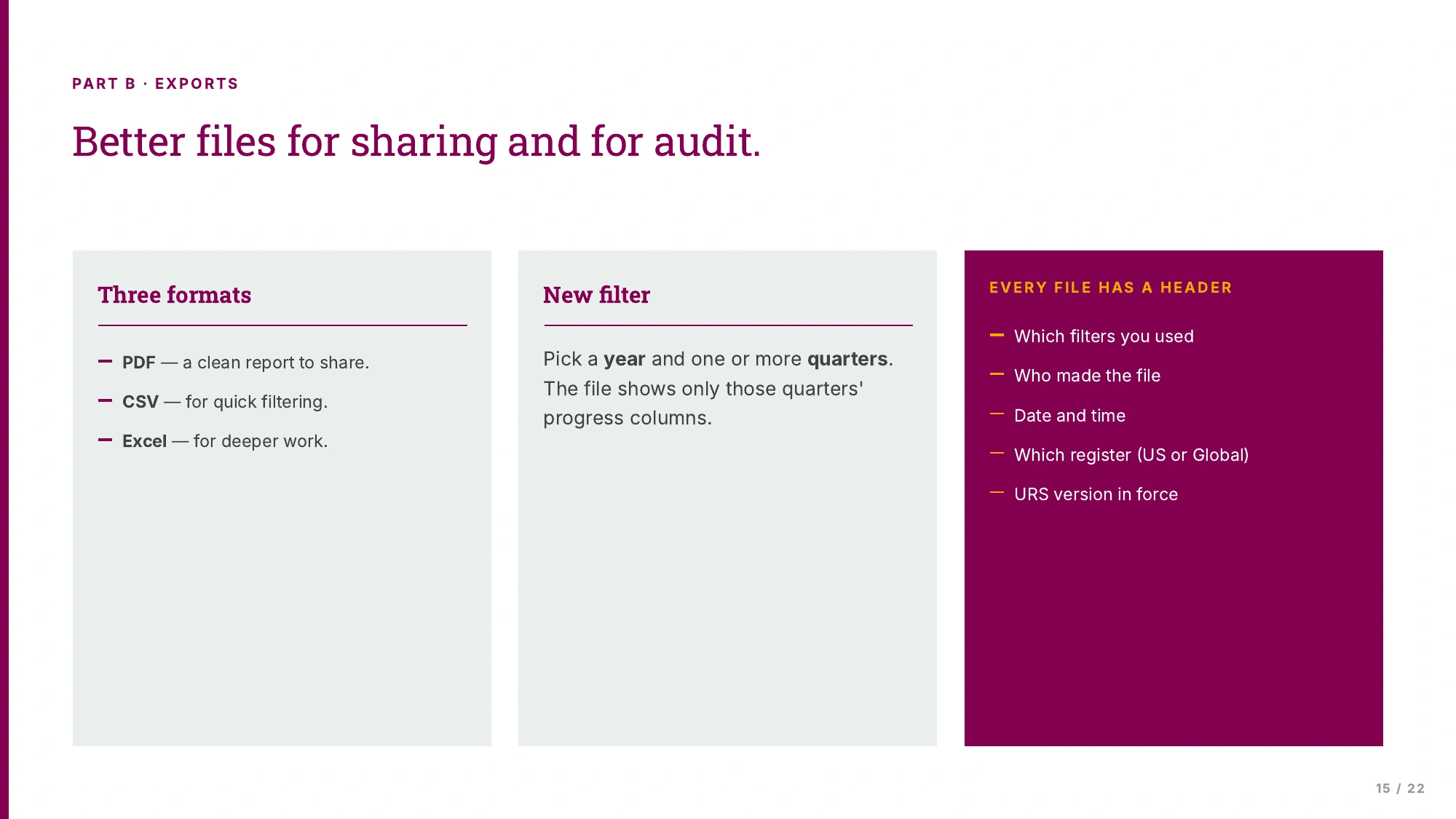
The first release was the built house. The pictures that follow are requirements and prototypes for changes we discussed after launch, not screenshots proving those changes shipped. Remember the red pen? The business owner needed each plan’s progress in her committee report, and the released app couldn’t show it yet.
Red Pen: Told you I’d be back.
I sketched a way to pick the report fields. The business owner said that was what she needed. I recorded the requirement for the next phase; I do not have a record of its later release.
- Risks
- Plans
- Proof
- Big Sheet’s snacks
Grown-up skillListening after launch
Detective Proof says: lift the flapdates, counts and sources
- On 23 April 2026 the business owner said the app “got launched end of last month”. That proves the month, not the day.
- The report sketch was a proposal. The record shows she liked it. It doesn’t show that it shipped.
- The report slide lists PDF, CSV and Excel. A week later, after ECS’s notes, version 1.11 of the rule book trimmed exports to PDF and CSV.
Built so far. Just added: Moving day
A new wing, and the day “late” became “missing”.
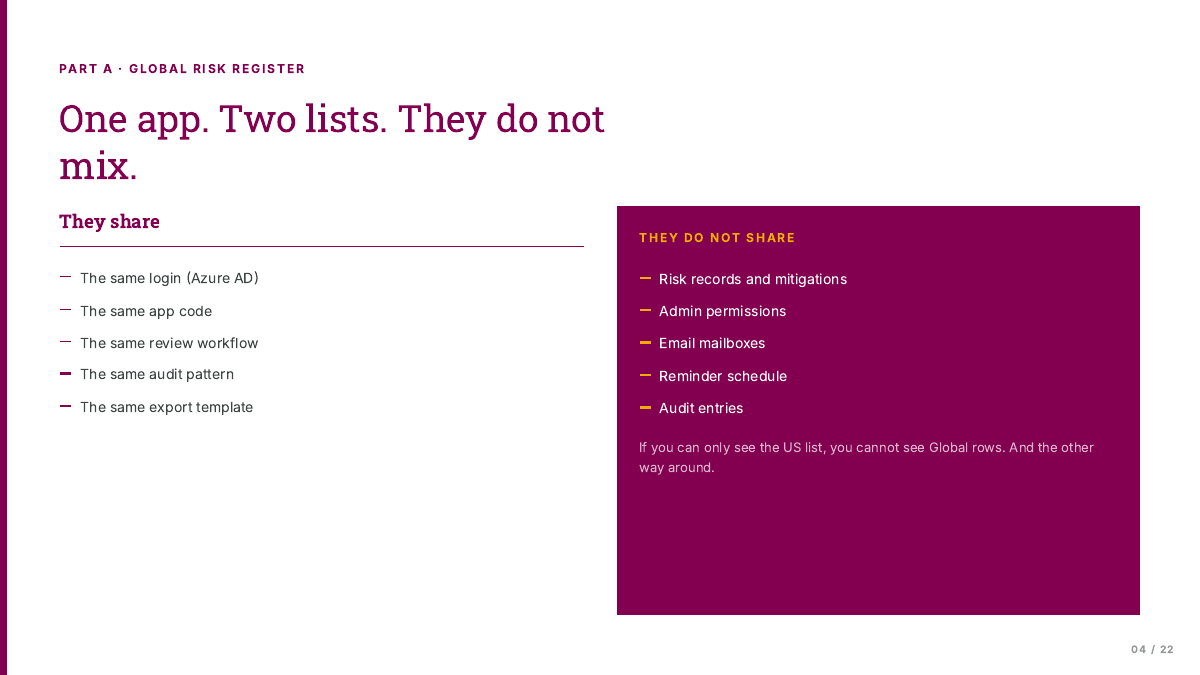
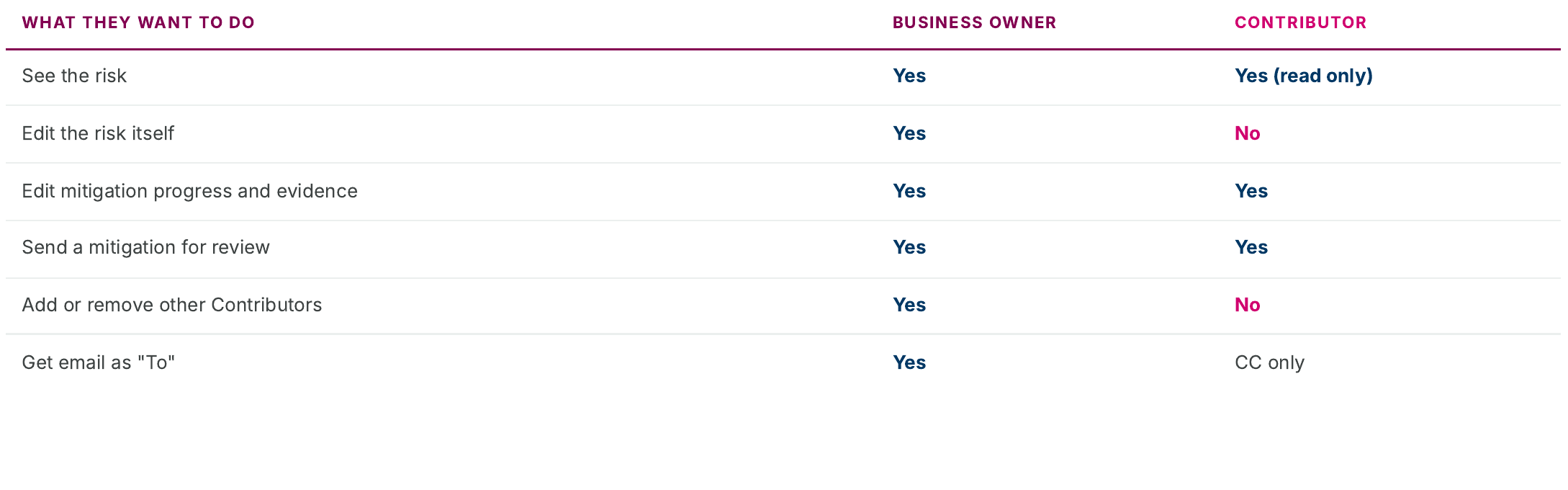
After the US release, we planned a new wing for Global in the same app. The business owner described it as about 95% the same, with a few more risk areas and names. I specified separate records and access, plus a way for contributors to help without owning a risk. These were next-phase requirements, not a confirmed Global launch.
Scope Creep: See? I told you there’d be more.
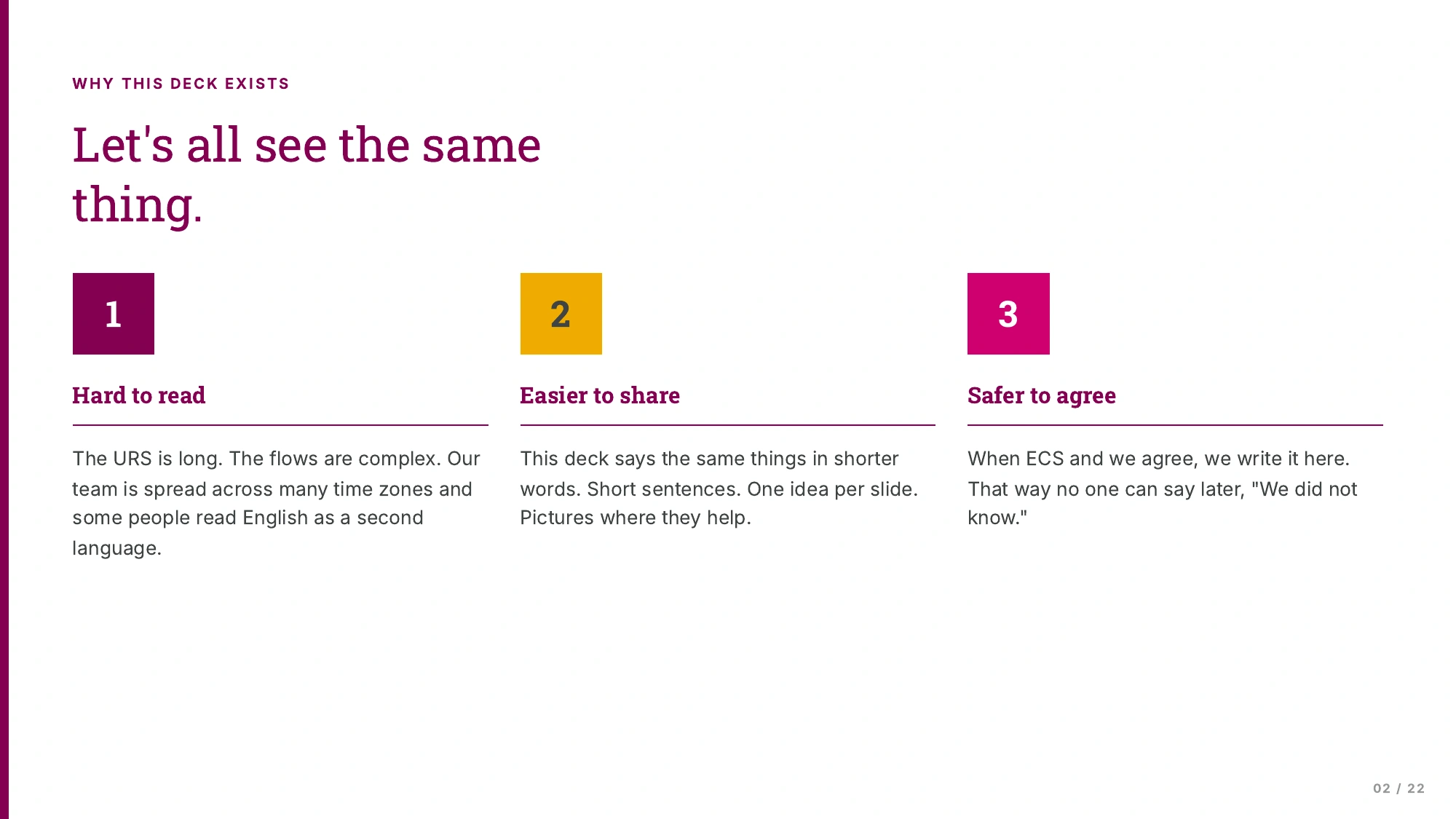
The blueprint was getting long again. So I made a picture guide for the whole crew. It was a plain-language deck with short words and one idea per slide. That way everyone could agree on the plan before building it.
My guide said a task was late if nobody touched it for a while. Two days later, the business owner spotted a problem. The work might be done, she said. Someone just hadn’t written it down yet.
She was right, and this is where I learned the most. Together we rewrote the rule around missing updates instead. Remember that late-work rule we saved for later? It came back with a kinder name.
Scoot: So I’m not late? I’m just… missing?
Me: Totally different. Missing means somebody is coming to find you.
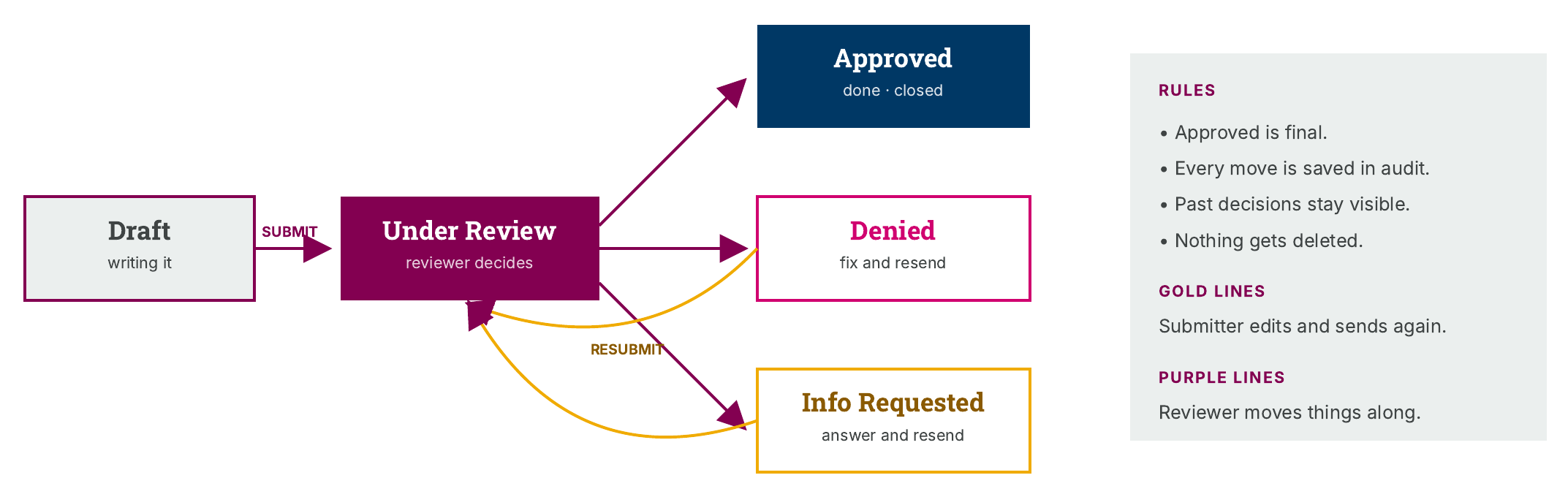
Then came the busiest week of all. The proposed plan added policy exceptions. That workflow still needed Compliance's approval; it was separate from the already released risk register. “Deny” became “Decline”. On one day we worked through five new versions of the blueprint together.
Makey: Did you grade your own work?
Me: Nope. We checked it against the meeting.
At the end of April I finished my last version. In May I walked a teammate through the blueprint, started handing it over, and set off on my next adventure: an AI Workbench prototype. That’s a different book.
21 April
Late
Nobody touched it for a set number of days.
23 April
Missing
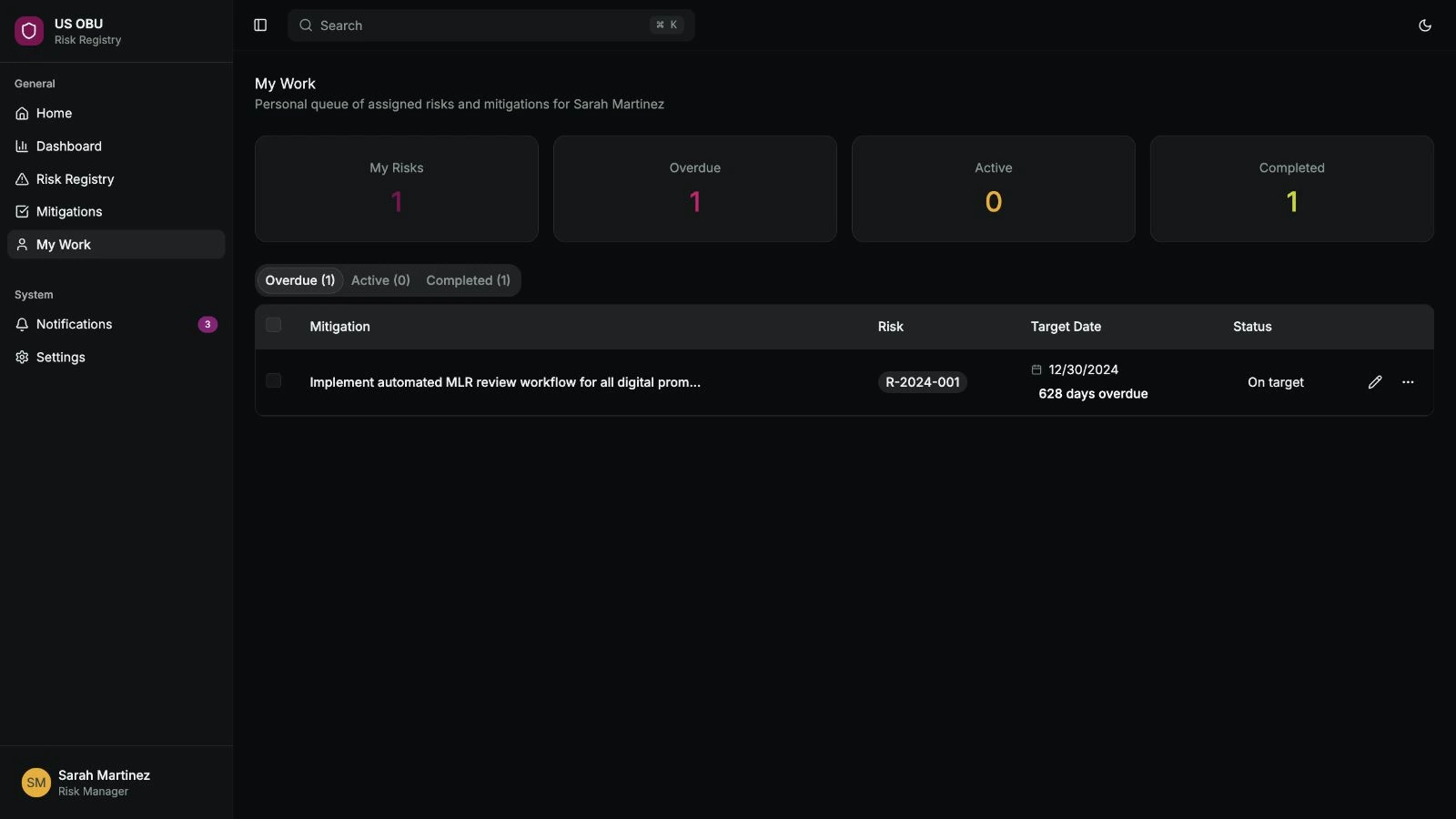
This quarter’s update is blank. It shows up in My Tasks until someone records it. No red, no blame.
More words we changed6 more swaps
It wasn’t the only word we changed.
Old word: Business risk ownerNew word: Business ownerJan 2026, two names for one jobOld word: My WorkNew word: My Tasksv1.4, 16 AprilOld word: DenyNew word: Declinev1.9, 23 AprilOld word: Audit TrailNew word: Version HistorySuggested Jan 2026, everywhere by v1.10Old word: Green checkNew word: Trash canThe delete button, Jan 2026Old word: EvidenceNew word: Supporting DocumentationTesting in Feb, the whole rule book by v1.10
Try my policy exception prototype(opens Figma in a new tab)
Grown-up skillChanging my mind for a good reason
More from this chapter7 more things
Detective Proof says: lift the flapdates, counts and sources
- Plain-language deck, 21 April 2026. Page 6 has the old “late” rule.
- 23 April 2026 walkthrough: “missing” was chosen over “overdue” to avoid a bad mark in the audit trail. The team had already removed the red warning color on 2 April.
- Rule book versions 1.7 and 1.8, same day: blank updates for this quarter appear in My Tasks, older gaps stay until recorded, and future quarters stay out until they start. Reminder emails open My Tasks directly.
- 16 April 2026: the Global register was approved. ECS planned to build Phase 2 in three pieces, one at a time. That is a plan, not a finish line.
- The policy exception workflow had its own section, waiting for a separate Compliance committee sign-off.
- 21 April 2026: alongside the plain-language deck, I made a 40-slide deck for ECS. It covered every email the app sends, who can do what, and awkward cases, like an owner leaving in the middle of a quarter.
- 5 to 7 May 2026: handover started. I haven’t seen a final sign-off that it finished, so I call it started, not done.
- My Workbench screens and review gates were prototypes on sample data. Teammates owned the backend and domain workflows.
- 23 April 2026 walkthrough: the Global register was described as about 95% the same as the US one, with naming changes and added risk areas.
Built so far. Just added: A kinder word
- A reason to move
- Knowing who lives here
- A front door first
- The building code
- Little models
- A shared idea of “finished”
- Moving day
- A kinder word
Welcome home.
Big Sheet could finally stretch out in the app ECS released. The blueprint also planned a next-phase list called My Tasks, where missing updates would wait until someone recorded them. That later release is not established by these records.
Chatty: NOW is it my turn?
Me: You’re on the list for Phase 3.
Chatty: Ooh. I love a list.
Times Chatty asked “Is it my turn yet?”4
And me? I started handing over the blueprint, waved goodbye, and headed off to my next adventure.
What I packed for my next adventure
- Seeing the whole mess first
- Learning before building
- Saying “not yet” to a good idea
- Working inside the rules
- Helping everyone picture the same thing
- Agreeing what “finished” means
- Listening after launch
- Changing my mind for a good reason
Look how much the blueprint grew
One pencil mark for every version, like a door frame at home. There are 18. Most of the growing happened in April.
Every version18 marks
- v1.1729 Apr 2026
I wrote down what the 29 April working session decided. A policy exception is Approved, Declined or Under Review.
- v1.1629 Apr 2026
I shortened the history table. The full history went to the archive.
- v1.1528 Apr 2026Five in one day!
Clean-up day. The cover finally showed the right version number.
- v1.1428 Apr 2026
I got ready for the next day’s working session, with four questions for the business owner.
- v1.1328 Apr 2026
The policy exception section was finished: who records each decision, and the emails it sends.
- v1.1228 Apr 2026
I added the business owner’s comments. “OBULT” became “OBU LT”.
- v1.1128 Apr 2026
I worked through ECS’s notes. Exports became PDF and CSV, with a fixed report layout.
- v1.1027 Apr 2026
“Audit Trail” became “Version History”. Competition came back, so Global had 6 risk areas again.
- v1.923 Apr 2026Four in one day!
“Deny” became “Decline”.
- v1.823 Apr 2026
“Missing” everywhere. Global cut to 5 risk areas.
- v1.723 Apr 2026
I checked every line against the walkthrough and closed 5 gaps.
- v1.623 Apr 2026
Reports you can filter by year and quarter, with fields you pick.
- v1.521 Apr 2026
Policy exceptions moved fully into the app. No outside form.
- v1.416 Apr 2026
“My Work” became “My Tasks”. Helpers can edit a plan without owning it. Phase 2 approved.
- v1.314 Apr 2026
A to-do list for each person, email links, and a flag for late work.
- v1.27 Apr 2026
A second register for the Global team, with its own access and emails.
- v1.19 Feb 2026
Canceled status, user permissions and quarter tracking. The dashboard moved to Phase 2.
- v1.014 Nov 2025
The first draft.
No envelopes home yet. One hides in every chapter's drawing. Go back and catch them!
A note from the author
Detective Proof: Where’s the proof it helped?
Me: No one measured it. That’s my next lesson.
Here is the honest page. There is no record of how many people used the app, or how much time it saved. We pushed the dashboard for tracking results by role to Phase 3. Tracking our own work was hard too. Feedback lived in three places. In May, I suggested one weekly list: new requests, work in progress, and work done. It hadn’t caught on yet.
Next time, I’d collect the numbers that tell us whether the new home is helping. How many owners fill in their update each quarter? How long does the quarterly report take? How many updates go missing?
Detective Proof says: lift the flapdates, counts and sources
- No adoption count, time saved, KPI result or survey exists in the project record.
- The role-based KPI dashboard moved to Phase 3 in the 21 April 2026 deck.
- 5 May 2026: feedback was split across the requirements, email and Adobe XD. I asked for one weekly requested, active and done view. The record says it hadn’t been adopted.