AstraZenecaPart 1 of 5
A risk register for US Oncology Compliance
AstraZeneca
Quarterly risk updates lived across a spreadsheet, reminder emails, and hand-built slides.
My decision
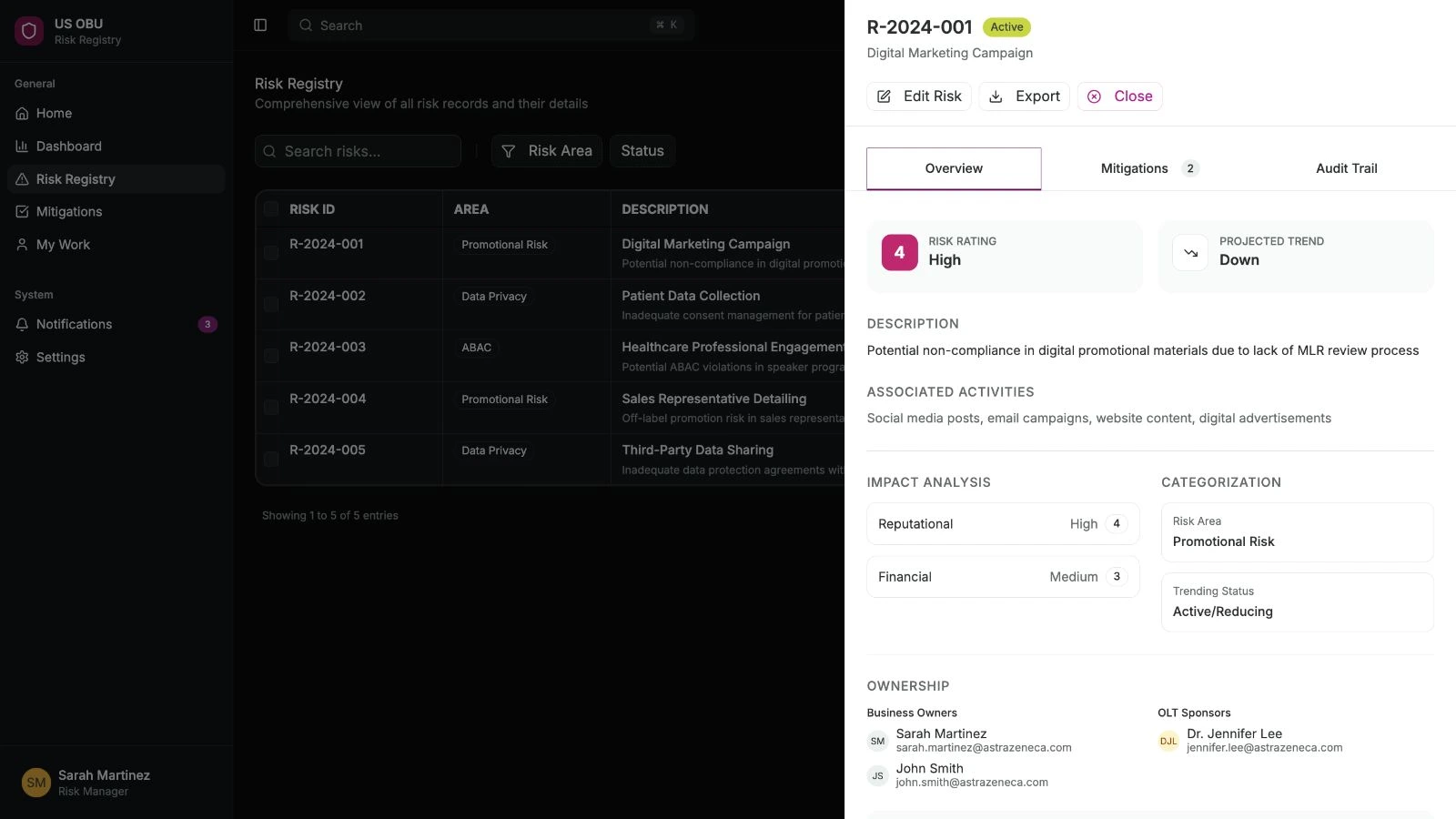
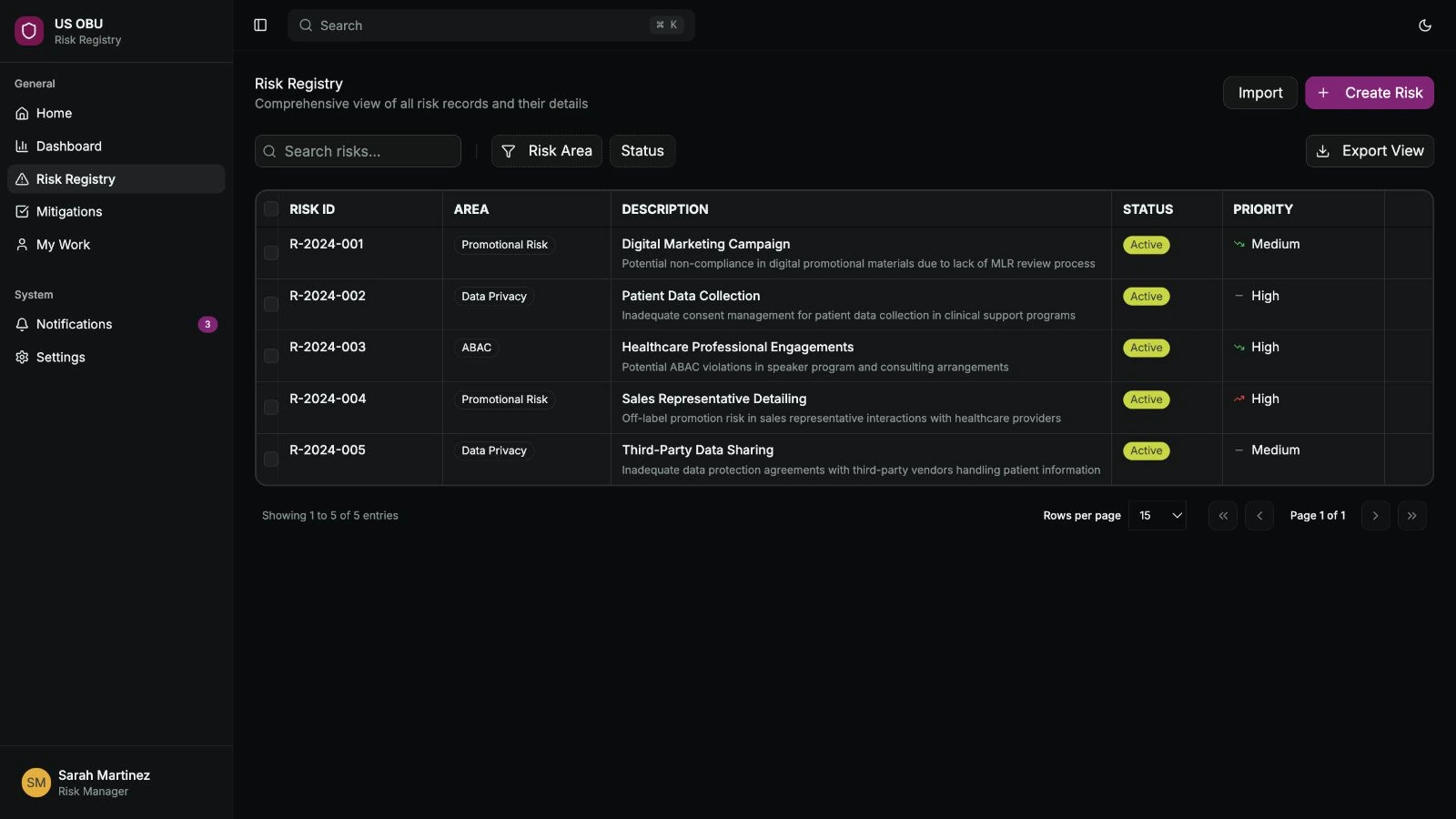
Let someone open a risk and update a mitigation without losing their place in the register.
- The design change
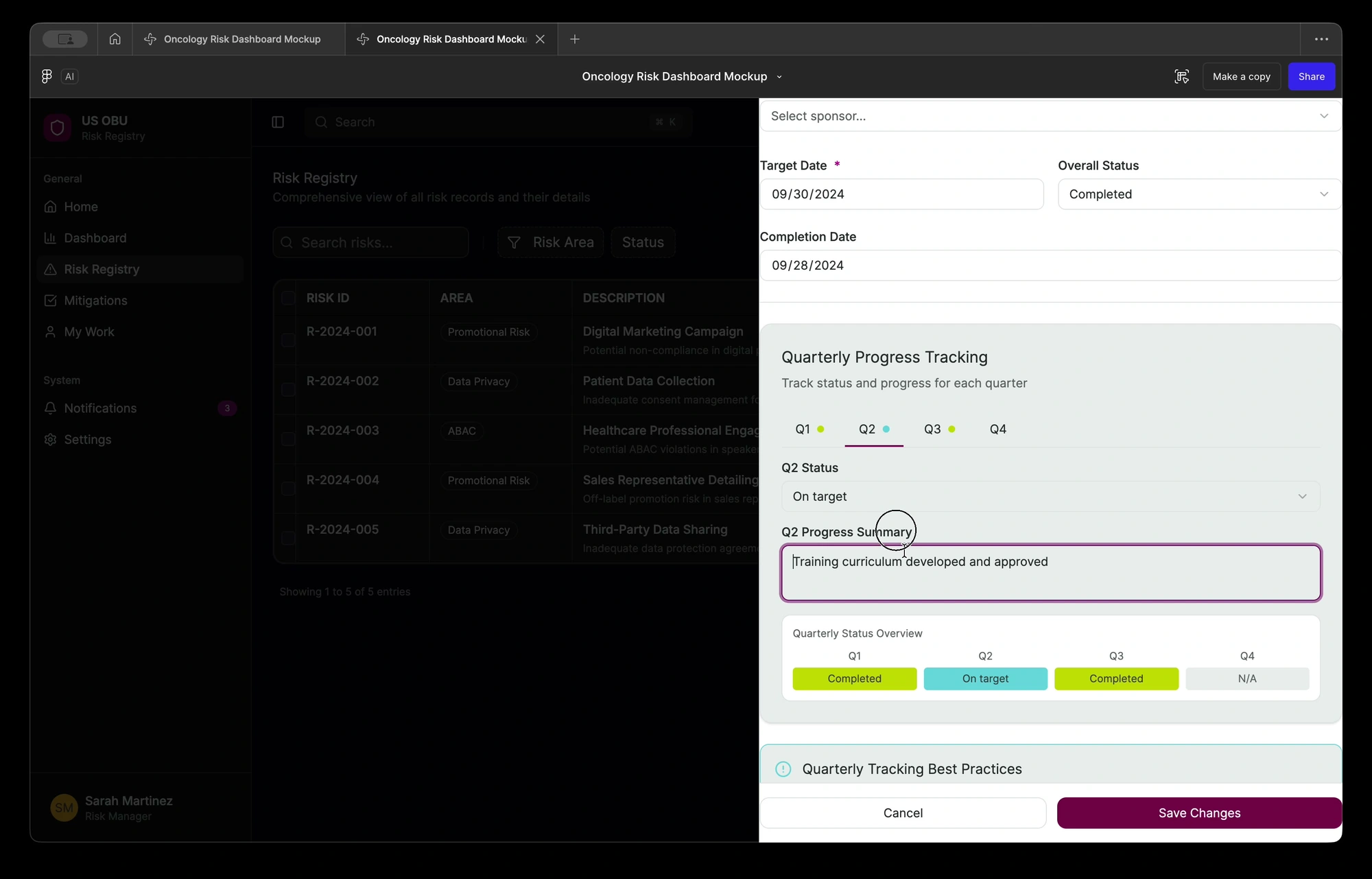
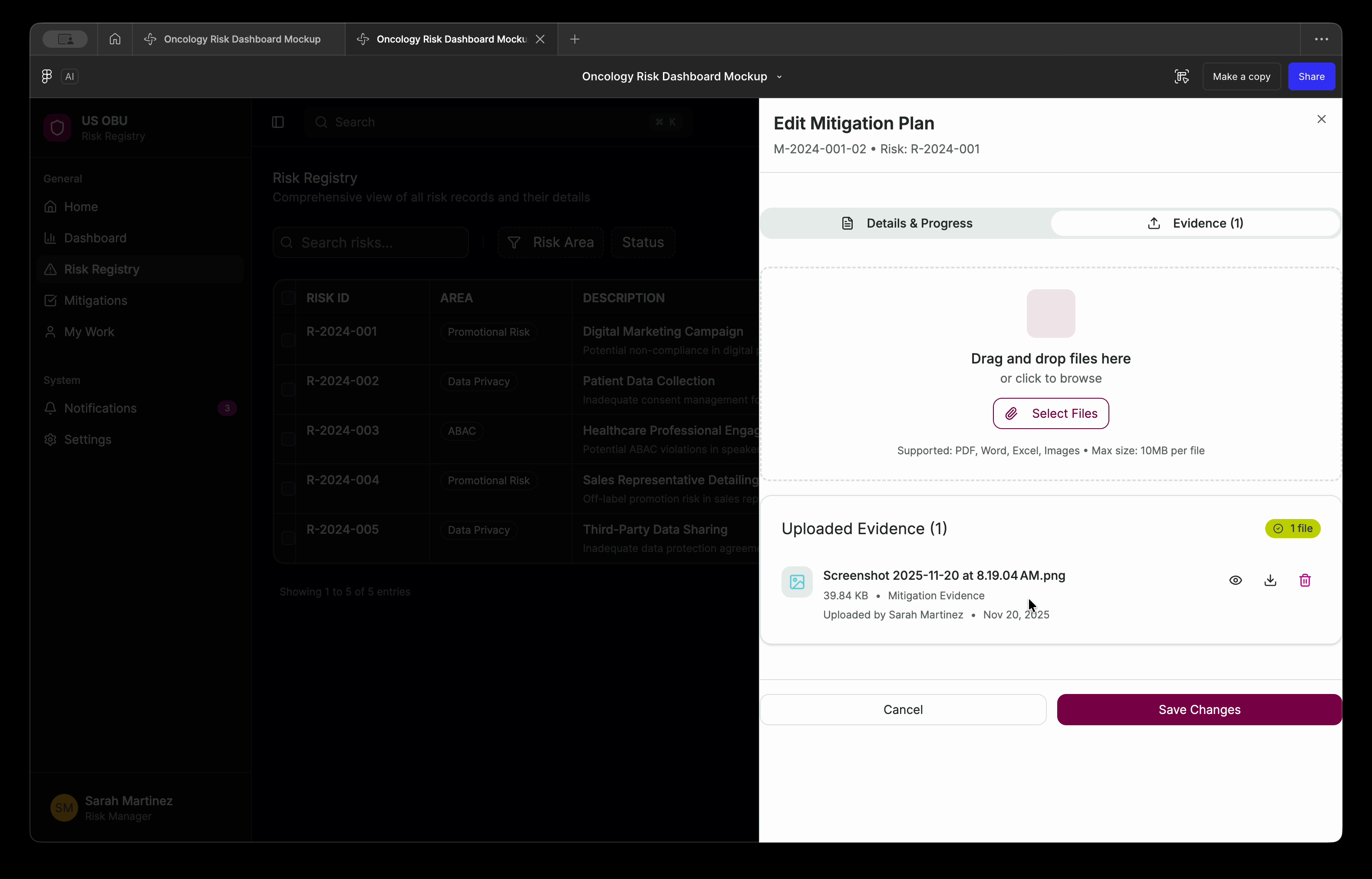
- The prototype keeps the list beside the record, with quarterly updates and supporting documents in context.
- What happened
- I wrote the requirements and prototypes and coordinated business testing. ECS built the Power Apps release, which launched in March 2026.
- Role
- My contract title was Senior UI/UX Business Analyst; I also worked as a UX designer and AI engineer. I designed and built across compliance, internal products, forecasting and medical AI, with business owners and engineering teams.
Facts
- Engagement
- August 2025 to August 2026
- Contract title
- Senior UI/UX Business Analyst
- Business units
- US Oncology, then Global Medical Affairs from May 2026
- Released
- Risk register, March 2026. Spec by me, built by ECS.
- PinkPulse
- Working resource hub for the breast franchise; I designed its discovery and interface directions.
- AI Workbench
- Working Global Medical Affairs product; my interface and workflow prototypes shaped the shared experience.
- Worked with
- A Compliance business owner and reviewers, AstraZeneca's delivery team ECS in India, medical specialists, engineers and a leadership sponsor
Make the record trustworthy
A spreadsheet, an inbox and a slide deck
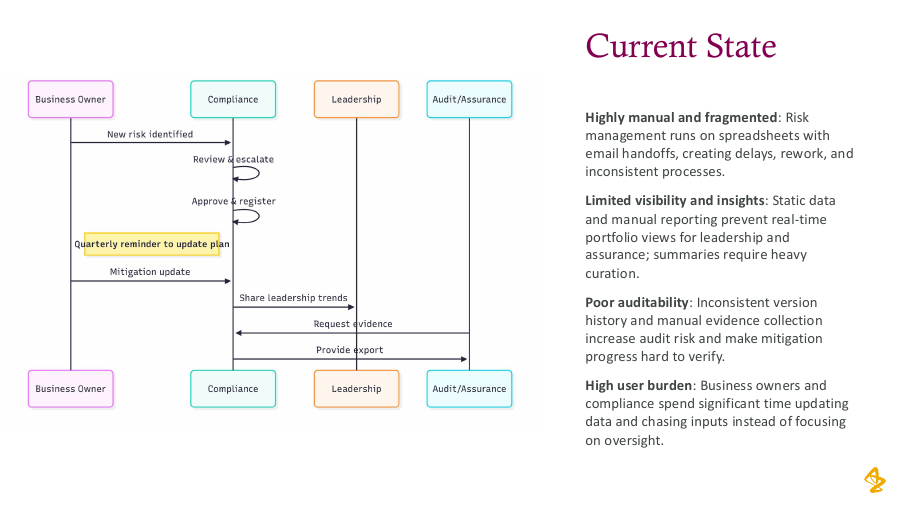
Every quarter, Compliance had to ask business owners for their risk updates, then prepare a report for leadership. The report needed three answers. Which commercial risks need attention? Who owns each mitigation plan? What changed since last quarter? Getting them took a spreadsheet, a round of reminder emails and a slide deck rebuilt by hand for leadership. Keeping an audit trail across spreadsheet versions was manual too.
I worked on the project as a UI/UX Business Analyst and AI Engineer, planned at half time. I sat between the Compliance business owner and ECS, AstraZeneca's delivery team in India, which built the app in Power Apps. I wrote the requirements spec, built the interface prototypes and coordinated business testing. The business owner and Compliance made the product calls. My job was to turn each call into something ECS could build and she could check.
Contribution
Compliance owned the decisions and ECS owned the build. I owned the spec, the prototypes and the testing process.
Inspect the inherited process and early reviews
Before the register
Goals before the spec
Before the requirements were written, my September 2025 design document set six goals and described four kinds of user, each with a need, a pain and a measure of success. Those measures were targets; nobody measured the results against them.
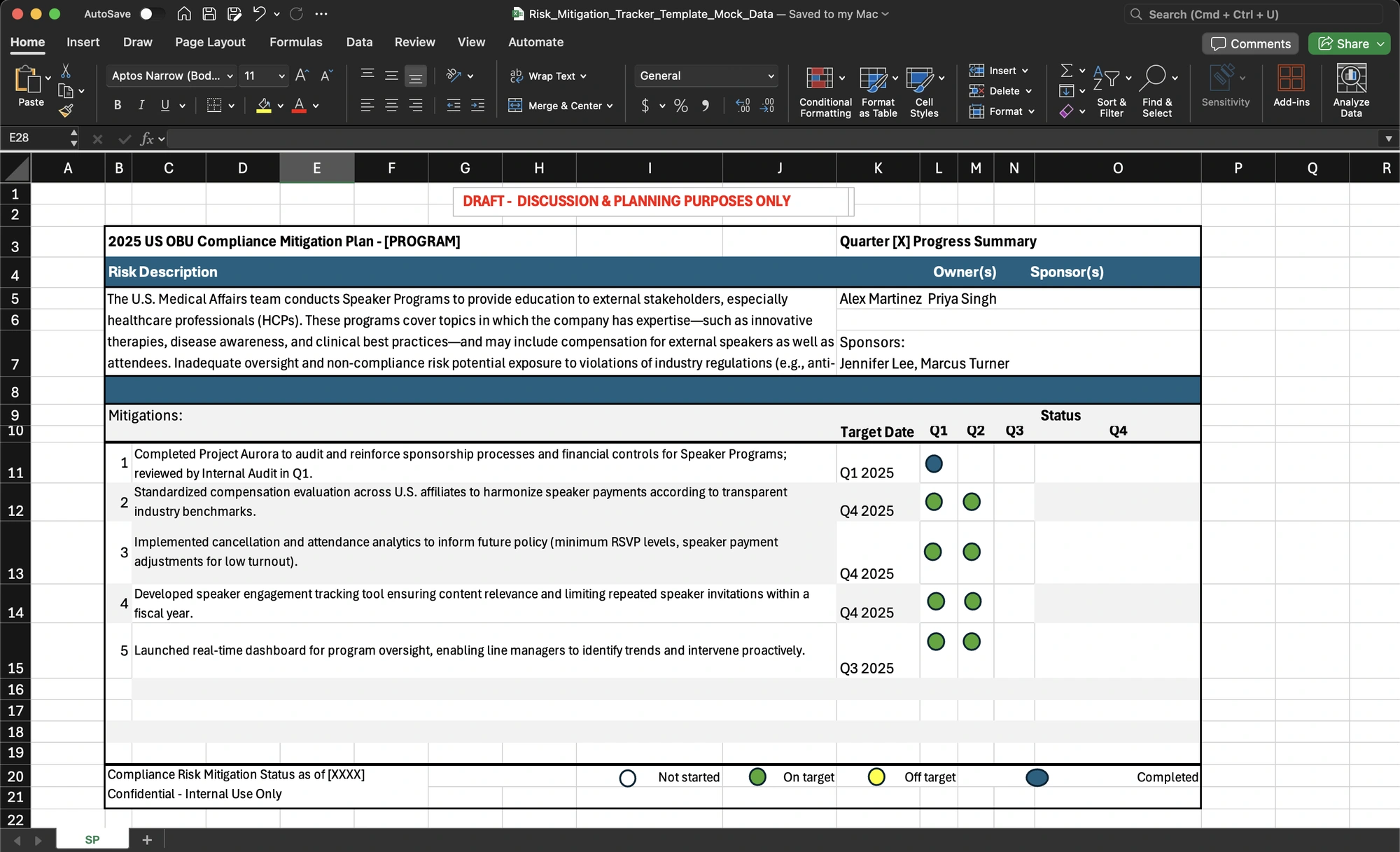
I copied Compliance's spreadsheet templates and filled them with made-up records. The team could work with realistic fields without using real risk data.
Mock data, real fields
One correction before sign-off
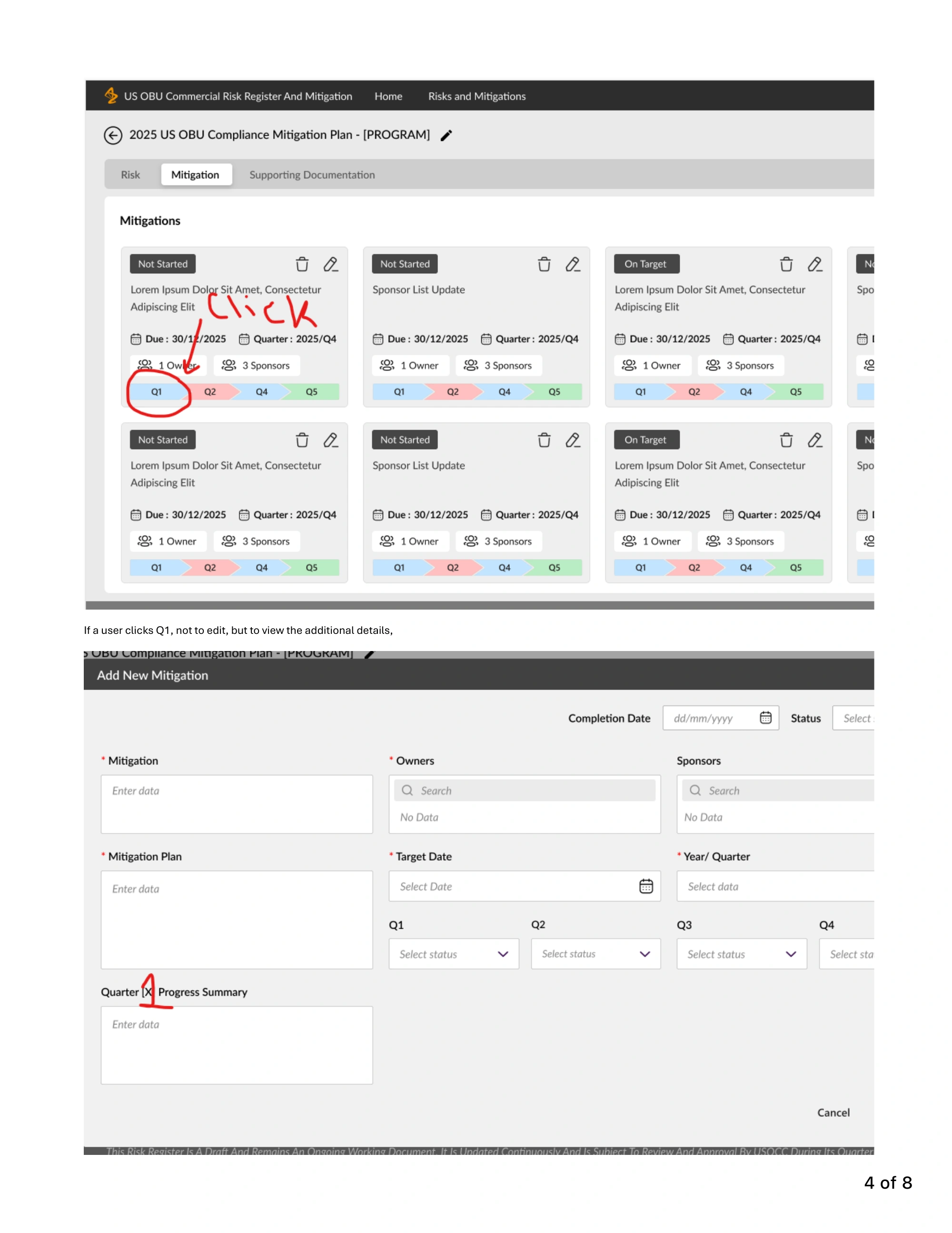
Before the spec settled, I gathered the spreadsheet templates, a Power BI demo, my Figma screens and ECS's wireframes into a reference pack. In the December review, the business owner marked up ECS's mitigation view. ECS confirmed the changes, and she approved it with one correction to the order of the quarters. The screen was still a proposal, but the review gave us a shared answer about what to build.
The owner's red pen
What the register does
One idea ran through the prototype. Someone updating a mitigation shouldn't lose their place in the register. In December I sent these screens to ECS with the spec as the reference for field names and layout.
Open a risk, update a quarter, attach evidence
The business owner's scope calls
The dashboard moved twice
The October 2025 plan put data entry, email reminders and a Power BI dashboard in the first release. A chatbot came next, and other regions last. From the start the team put data entry ahead of the chatbot.
In February, after talking with her manager, the business owner moved the dashboard to Phase 2. ECS had already started building it. In April, Compliance moved it again, to Phase 3, so Phase 2 could focus on the registers and policy exceptions. The Global team's register went the other way, from last in line into Phase 2.
Each move was her call or Compliance's. My part was to make each call stick. I carried every change into the spec's scope table, which listed seven deferred items by February. Nothing could drift back in unless someone decided it should.
Where each item sat, and when

Keeping the build date
In late January most of the wireframes were ready and a few weren't. The business owner and I prepared the review meeting together, and one success criterion was that the 13 February development target held. So I proposed splitting the sign-off. Seventeen screens were ready, and she approved them that day. Five changes were label-only, with no database impact. We agreed those in writing, each traced to its requirement, and ECS applied all five the next day.
Split the sign-off
Approve the 17 ready screens now and agree the five label-only changes in writing, so a handful of wording fixes didn't hold up the development start.
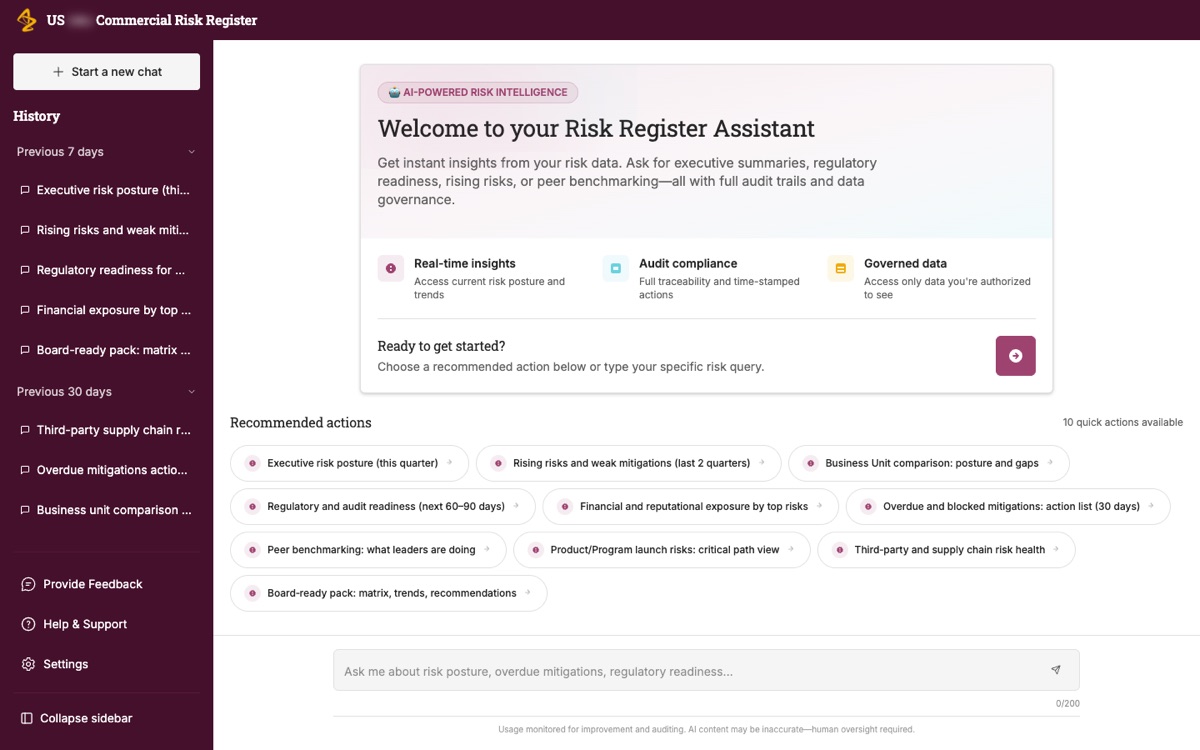
The assistant that could wait
The spec as a decision log
Who changed what, and why
The spec did two jobs. ECS built from it, and it recorded who decided what. Every version has a row saying what changed and whose review drove it, whether that was the business owner, Compliance reviewers or ECS.
It ran to 18 versions between November 2025 and April 2026. Sixteen came in April, while we scoped Phase 2 and the business owner worked in the live app. Several versions followed the April walkthrough and review sessions.
The reviews were detailed. On one February draft the business owner left 23 comments and dozens of tracked edits. I resolved all of them into a clean version before the build.
Two rules that came out of review
Compliance ruled that nobody could delete a risk record. Delete became a Canceled status with a required reason. I specified what happens underneath. Open mitigations under a canceled risk are canceled with it, and completed ones are kept.
The business owner caught a wording problem too. A blank quarterly update doesn't mean the mitigation is late. It means nobody has recorded it yet. Calling it Overdue would put a negative judgment on an owner before anyone knew whether the work was done. I changed the rule and its label to Missing. That gave the reviewer a question to resolve instead of a false conclusion.
18 versions, 16 in April

Business testing
43 observations in four days
Business testing ran from 17 to 20 February 2026. ECS sent the app link the day before it started, after the business owner and I had asked for early access for weeks. The night before, I sent one updated spec that took in a week of feedback, with 41 changes traced to their requirements.
The business owner logged 43 observations. 32 were minor, 7 medium and 4 major. ECS fixed 32 inside the window. All four major items came back marked "deferred to Phase 2". One was the overdue rule. Another was the logic of the My Work tab, which ECS said could affect the stability of the release.
What testing found, and what happened to it

Who gets to say "later"
Deferring those four may well have been the right call. The problem was who made it. ECS was moving work out of the release, and the business owner hadn't agreed to it.
So the rule came after the deferrals. On 23 February the business owner, the IT leads and I met and agreed it. Nothing moves to Phase 2 without her explicit approval and a documented effort estimate. I wrote the process that put the rule into practice, and the tracker template behind it.
The process opens with one line. ECS owns the process, the business owner approves, and I facilitate and escalate. For each proposed deferral, ECS writes up the reason, an effort estimate and the business value, and links the write-up from the tracker row. The item stays In Progress until she decides. If she says no, ECS delivers it in Phase 1 or proposes an alternative.
I kept my own part narrow. I would step in only if an item sat Open for more than two business days or stayed disputed across two stand-ups. That kept the decision with the person who owned it.
The deferral gate

No deferral without the owner's sign-off
An observation could leave the release only with a written reason, an effort estimate and the business owner's approval. ECS could propose. It couldn't decide.
Scope
This is the process as written on 23 February. My tracker snapshot ends on 20 February, so I can't show how many items went through the gate afterwards.
Launch
Live in March 2026
The original plan said January. A revised plan in February said the end of that month. The first release went live in March 2026, about two months after the original date. The last gate was the business owner approving the final requirements in the company's document system on 11 March.
That approval needed a Phase 1-only document. ECS removed the Phase 2 material and restructured the spec before she signed, so the approved Phase 1 version is partly their text.
What use revealed
Once the business owner used the register for real work, two gaps showed up that testing hadn't caught.
Access isn't accountability
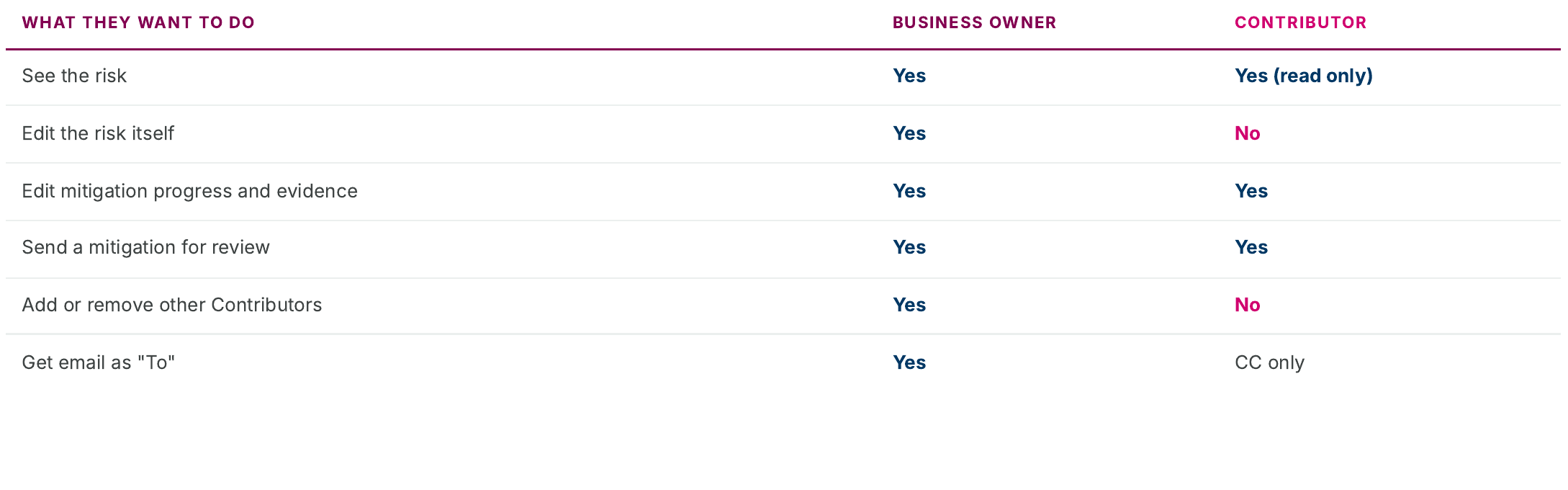
One team's business owners had helpers who did their quarterly data entry. A helper needed to enter progress without becoming accountable for the risk. The only way to give that helper access was to label them a business owner too. That put the wrong person on the accountability record. I specified a Contributor role. Contributors can update mitigation progress, attach supporting documents and submit updates for review. They can't edit the risk itself, and the version history shows the Contributor's name, not the owner's.
Contributor permissions
Reports without progress
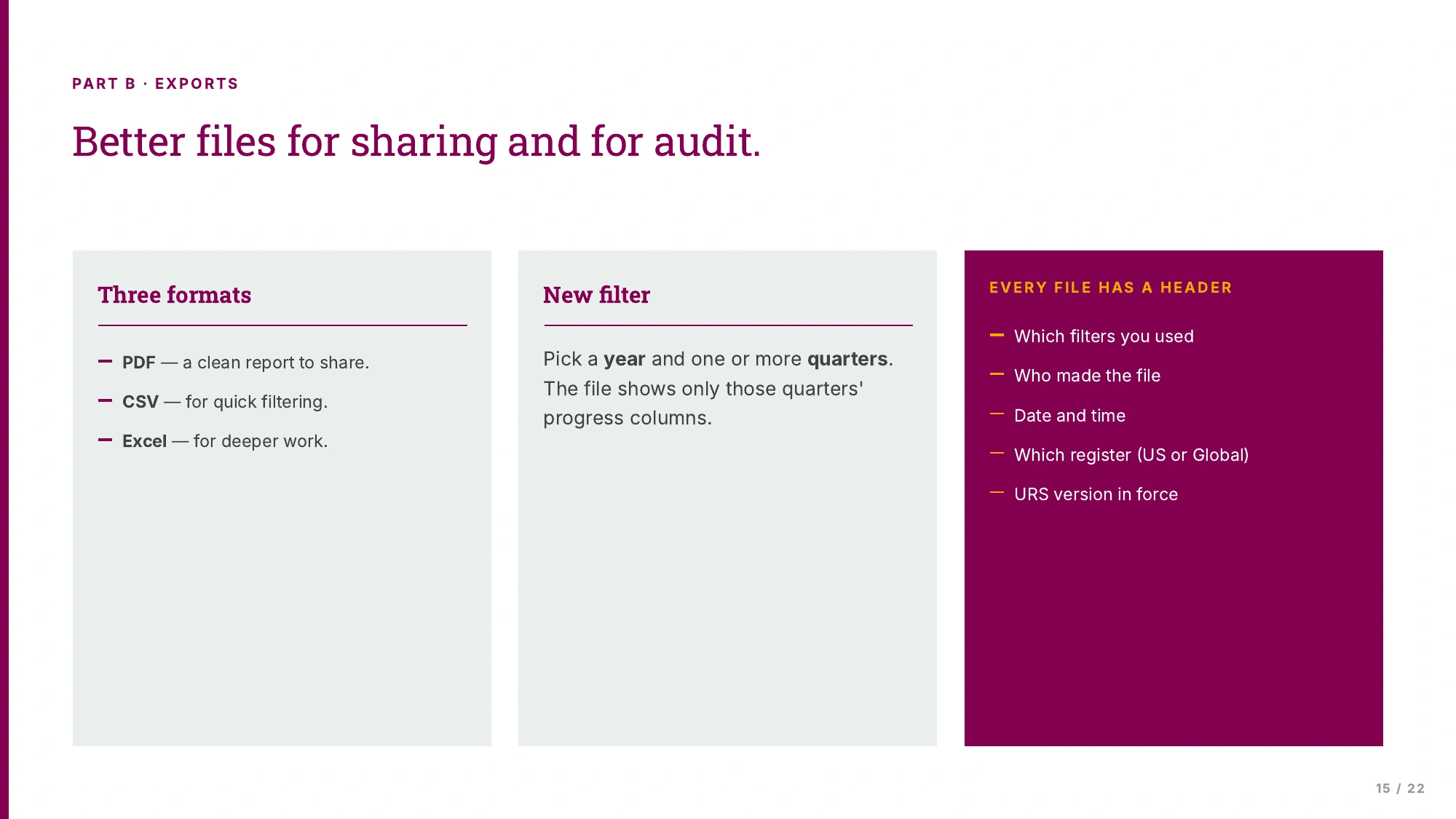
The business owner needed mitigation progress in her compliance committee reports, and the export couldn't include it. I mocked up field selection and specified year and quarter filters, with each file recording its filters, author, date and spec version.
What the export had to carry
Phase 2 scope
Saying what waits
Phase 2 for the US register and the Global register was approved on 16 April 2026. It covered a My Tasks view, the Missing rule, the Contributor role and reporting. Compliance hadn't approved the policy-exception workflow, so I gave it its own section of the spec. The compliance part tells that story.
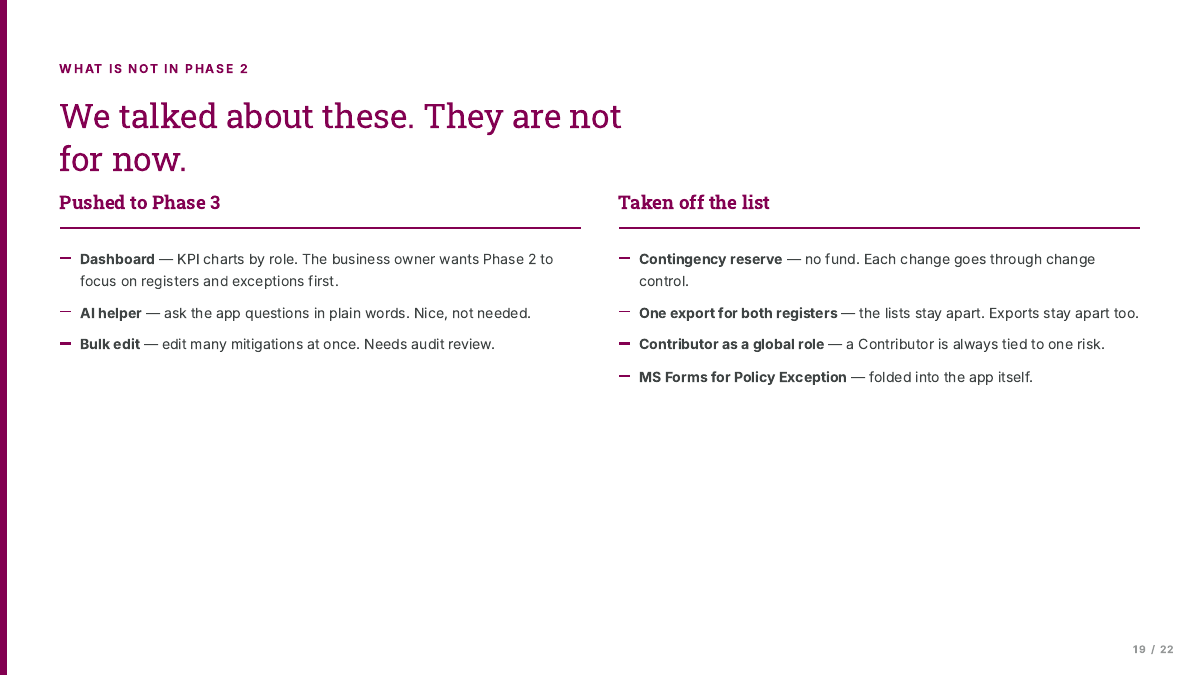
Most of the scope work was deciding what waited. In the April deck I kept a log of ten ideas we had talked about and left out of Phase 2. Each line said who raised the idea, what happened to it and why.
In May 2026 I began handing the requirements work to a colleague and moved to the Global Medical Affairs AI Workbench. I don't know whether Phase 2 shipped.
Every "not now" gets a reason
Two lines in the log show the reasons a compliance tool needs. The AI helper moved to Phase 3 because the business owner judged it nice to have, not needed for the compliance workflow. Bulk edits across many mitigations waited because they change the audit record, so Compliance had to review them first. Other lines moved the KPI dashboard to Phase 3, kept every export to one register, and moved exception requests from a separate form into the app so sign-on, audit and role checks applied.
Contribution
I kept the log. The business owner, Compliance and ECS made the calls it records.
The April scope deck
Results
- The first release went live in March 2026. ECS built it in Power Apps. I wrote the requirements spec, built the prototypes and coordinated business testing.
- Business testing logged 43 observations in four days, and ECS fixed 32 inside the window. After testing, the written process said nothing could leave the release without a reason, an effort estimate and the business owner's approval.
- Phase 2 scope was approved in April 2026. I specified the Contributor role and the reporting changes that came out of early use.
Evidence limit
We launched without instrumentation, so there are no adoption, time-saved or error-rate figures and no baseline for the manual process. I began handing over in May 2026 and don't know whether Phase 2 shipped.